 42ac2b0f98
* Improve documentation

* Fix should be not possible to validate a VTherm without underlyings

---------

Co-authored-by: Jean-Marc Collin <jean-marc.collin-extern@renault.com>
488 lines
17 KiB
Markdown
488 lines
17 KiB
Markdown
# Quelques compléments indispensables
|
||
|
||
- [Quelques compléments indispensables](#quelques-compléments-indispensables)
|
||
- [Versatile Thermostat UI Card](#versatile-thermostat-ui-card)
|
||
- [Composant Scheduler !](#composant-scheduler-)
|
||
- [Courbes de régulattion avec Plotly](#courbes-de-régulattion-avec-plotly)
|
||
- [Les notification avec l'AappDaemon NOTIFIER](#les-notification-avec-laappdaemon-notifier)
|
||
- [Une très belle carte (merci @Jeffodilo)](#une-très-belle-carte-merci-jeffodilo)
|
||
|
||
|
||
## Versatile Thermostat UI Card
|
||
Une carte spéciale pour le Versatile Thermostat a été développée (sur la base du Better Thermostat). Elle est dispo ici [Versatile Thermostat UI Card](https://github.com/jmcollin78/versatile-thermostat-ui-card) et propose une vision moderne de tous les status du VTherm :
|
||
|
||

|
||
|
||
## Composant Scheduler !
|
||
|
||
Afin de profiter de toute la puissance du Versatile Thermostat, je vous invite à l'utiliser avec https://github.com/nielsfaber/scheduler-component
|
||
En effet, le composant scheduler propose une gestion de la base climatique sur les modes prédéfinis. Cette fonctionnalité a un intérêt limité avec le thermostat générique mais elle devient très puissante avec le Versatile Thermostat :
|
||
|
||
À partir d'ici, je suppose que vous avez installé Versatile Thermostat et Scheduler Component.
|
||
|
||
Dans Scheduler, ajoutez un planning :
|
||
|
||

|
||
|
||
Choisissez le groupe "climat", choisissez une (ou plusieurs) entité(s), sélectionnez "MAKE SCHEME" et cliquez sur suivant :
|
||
(il est possible de choisir "SET PRESET", mais je préfère utiliser "MAKE SCHEME")
|
||
|
||
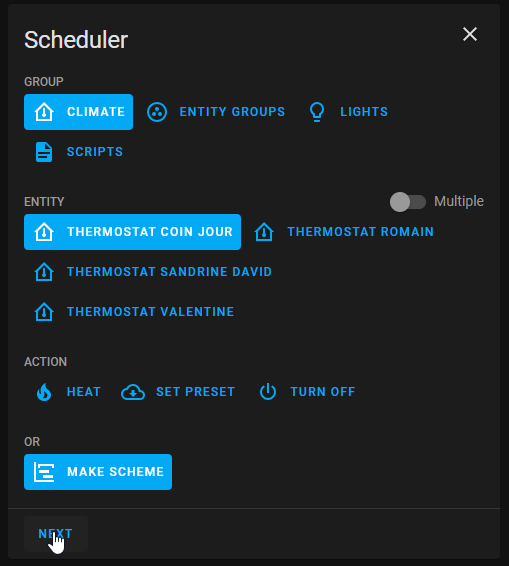
|
||
|
||
Définissez votre schéma de mode et enregistrez :
|
||
|
||
|
||

|
||
|
||
Dans cet exemple, j'ai réglé le mode ECO pendant la nuit et le jour lorsqu'il n'y a personne à la maison BOOST le matin et CONFORT le soir.
|
||
|
||
|
||
J'espère que cet exemple vous aidera, n'hésitez pas à me faire part de vos retours !
|
||
|
||
## Courbes de régulattion avec Plotly
|
||
Vous pouvez obtenir une courbe comme celle présentée dans [some results](#some-results) avec une sorte de configuration de graphique Plotly uniquement en utilisant les attributs personnalisés du thermostat décrits [ici](#custom-attributes) :
|
||
|
||
Remplacez les valeurs entre [[ ]] par les votres.
|
||
<details>
|
||
|
||
```yaml
|
||
- type: custom:plotly-graph
|
||
entities:
|
||
- entity: '[[climate]]'
|
||
attribute: temperature
|
||
yaxis: y1
|
||
name: Consigne
|
||
- entity: '[[climate]]'
|
||
attribute: current_temperature
|
||
yaxis: y1
|
||
name: T°
|
||
- entity: '[[climate]]'
|
||
attribute: ema_temp
|
||
yaxis: y1
|
||
name: Ema
|
||
- entity: '[[climate]]'
|
||
attribute: on_percent
|
||
yaxis: y2
|
||
name: Power percent
|
||
fill: tozeroy
|
||
fillcolor: rgba(200, 10, 10, 0.3)
|
||
line:
|
||
color: rgba(200, 10, 10, 0.9)
|
||
- entity: '[[slope]]'
|
||
name: Slope
|
||
fill: tozeroy
|
||
yaxis: y9
|
||
fillcolor: rgba(100, 100, 100, 0.3)
|
||
line:
|
||
color: rgba(100, 100, 100, 0.9)
|
||
hours_to_show: 4
|
||
refresh_interval: 10
|
||
height: 800
|
||
config:
|
||
scrollZoom: true
|
||
layout:
|
||
margin:
|
||
r: 50
|
||
legend:
|
||
x: 0
|
||
'y': 1.2
|
||
groupclick: togglegroup
|
||
title:
|
||
side: top right
|
||
yaxis:
|
||
visible: true
|
||
position: 0
|
||
yaxis2:
|
||
visible: true
|
||
position: 0
|
||
fixedrange: true
|
||
range:
|
||
- 0
|
||
- 1
|
||
yaxis9:
|
||
visible: true
|
||
fixedrange: false
|
||
range:
|
||
- -2
|
||
- 2
|
||
position: 1
|
||
xaxis:
|
||
rangeselector:
|
||
'y': 1.1
|
||
x: 0.7
|
||
buttons:
|
||
- count: 1
|
||
step: hour
|
||
- count: 12
|
||
step: hour
|
||
- count: 1
|
||
step: day
|
||
- count: 7
|
||
step: day
|
||
```
|
||
</details>
|
||
|
||
Exemple de courbes obtenues avec Plotly :
|
||
|
||

|
||
|
||
## Les notification avec l'AappDaemon NOTIFIER
|
||
Cette automatisation utilise l'excellente App Daemon nommée NOTIFIER développée par Horizon Domotique que vous trouverez en démonstration [ici](https://www.youtube.com/watch?v=chJylIK0ASo&ab_channel=HorizonDomotique) et le code est [ici](https://github.com/jlpouffier/home-assistant-config/blob/master/appdaemon/apps/notifier.py). Elle permet de notifier les utilisateurs du logement lorsqu'un des évènements touchant à la sécurité survient sur un des Versatile Thermostats.
|
||
|
||
C'est un excellent exemple de l'utilisation des notifications décrites ici [notification](#notifications).
|
||
|
||
<details>
|
||
|
||
```yaml
|
||
alias: Surveillance Mode Sécurité chauffage
|
||
description: Envoi une notification si un thermostat passe en mode sécurité ou power
|
||
trigger:
|
||
- platform: event
|
||
event_type: versatile_thermostat_security_event
|
||
id: versatile_thermostat_security_event
|
||
- platform: event
|
||
event_type: versatile_thermostat_power_event
|
||
id: versatile_thermostat_power_event
|
||
- platform: event
|
||
event_type: versatile_thermostat_temperature_event
|
||
id: versatile_thermostat_temperature_event
|
||
condition: []
|
||
action:
|
||
- choose:
|
||
- conditions:
|
||
- condition: trigger
|
||
id: versatile_thermostat_security_event
|
||
sequence:
|
||
- event: NOTIFIER
|
||
event_data:
|
||
action: send_to_jmc
|
||
title: >-
|
||
Radiateur {{ trigger.event.data.name }} - {{
|
||
trigger.event.data.type }} Sécurité
|
||
message: >-
|
||
Le radiateur {{ trigger.event.data.name }} est passé en {{
|
||
trigger.event.data.type }} sécurité car le thermomètre ne répond
|
||
plus.\n{{ trigger.event.data }}
|
||
callback:
|
||
- title: Stopper chauffage
|
||
event: stopper_chauffage
|
||
image_url: /media/local/alerte-securite.jpg
|
||
click_url: /lovelace-chauffage/4
|
||
icon: mdi:radiator-off
|
||
tag: radiateur_security_alerte
|
||
persistent: true
|
||
- conditions:
|
||
- condition: trigger
|
||
id: versatile_thermostat_power_event
|
||
sequence:
|
||
- event: NOTIFIER
|
||
event_data:
|
||
action: send_to_jmc
|
||
title: >-
|
||
Radiateur {{ trigger.event.data.name }} - {{
|
||
trigger.event.data.type }} Délestage
|
||
message: >-
|
||
Le radiateur {{ trigger.event.data.name }} est passé en {{
|
||
trigger.event.data.type }} délestage car la puissance max est
|
||
dépassée.\n{{ trigger.event.data }}
|
||
callback:
|
||
- title: Stopper chauffage
|
||
event: stopper_chauffage
|
||
image_url: /media/local/alerte-delestage.jpg
|
||
click_url: /lovelace-chauffage/4
|
||
icon: mdi:radiator-off
|
||
tag: radiateur_power_alerte
|
||
persistent: true
|
||
- conditions:
|
||
- condition: trigger
|
||
id: versatile_thermostat_temperature_event
|
||
sequence:
|
||
- event: NOTIFIER
|
||
event_data:
|
||
action: send_to_jmc
|
||
title: >-
|
||
Le thermomètre du radiateur {{ trigger.event.data.name }} ne
|
||
répond plus
|
||
message: >-
|
||
Le thermomètre du radiateur {{ trigger.event.data.name }} ne
|
||
répond plus depuis longtemps.\n{{ trigger.event.data }}
|
||
image_url: /media/local/thermometre-alerte.jpg
|
||
click_url: /lovelace-chauffage/4
|
||
icon: mdi:radiator-disabled
|
||
tag: radiateur_thermometre_alerte
|
||
persistent: true
|
||
mode: queued
|
||
max: 30
|
||
```
|
||
</details>
|
||
|
||
## Une très belle carte (merci @Jeffodilo)
|
||
|
||
@Jeffodilo a réalisé et partagé le code d'une très belle carte adaptée au TRV :
|
||
|
||

|
||
|
||
Cette carte n’utilise pas card_mod, elle utilise les cartes custom assez courante suivantes
|
||
On garde une partie de l’interface UI, sauf pour l’horizontale de la 2ème ligne
|
||
- custom:vertical-stack-in-card
|
||
- custom:stack-in-card
|
||
- custom:mini-graph-card
|
||
- custom:mushroom-template-card
|
||
- custom:button-card
|
||
|
||
L'original est ici (En Français): [forum HACF](https://forum.hacf.fr/t/carte-mise-en-forme-vanne-avec-thermostant-versatile/56132)
|
||
|
||
Evidemment, vous devez l'adapter à votre code.
|
||
|
||
Le code:
|
||
|
||
<details>
|
||
|
||
```yaml
|
||
type: vertical-stack
|
||
cards:
|
||
- type: heading
|
||
icon: mdi:bed-double
|
||
heading: Parents
|
||
heading_style: title
|
||
- type: custom:vertical-stack-in-card
|
||
cards:
|
||
- type: custom:mini-graph-card
|
||
entities:
|
||
- entity: sensor.sonde_parents_temperature
|
||
name: Température
|
||
state_adaptive_color: true
|
||
- entity: climate.valve_parents
|
||
name: Temp
|
||
attribute: current_temperature
|
||
unit: °C
|
||
state_adaptive_color: true
|
||
show_graph: false
|
||
show_state: true
|
||
hour24: true
|
||
hours_to_show: 24
|
||
points_per_hour: 2
|
||
font_size: 50
|
||
show:
|
||
name: false
|
||
icon: false
|
||
legend: false
|
||
labels: true
|
||
extrema: false
|
||
color_thresholds:
|
||
- color: "#33ccff"
|
||
value: 19
|
||
- color: "#00ffff"
|
||
value: 19.5
|
||
- color: "#33ffcc"
|
||
value: 20
|
||
- color: "#00ff99"
|
||
value: 20.5
|
||
- color: "#ffff99"
|
||
value: 21
|
||
- color: "#ffff33"
|
||
value: 21.5
|
||
- color: "#ff9933"
|
||
value: 22
|
||
- color: "#cc6633"
|
||
value: 24
|
||
- color: "#ff6000"
|
||
value: 26
|
||
- type: custom:stack-in-card
|
||
mode: horizontal
|
||
cards:
|
||
- type: custom:mushroom-template-card
|
||
secondary: ""
|
||
layout: horizontal
|
||
tap_action:
|
||
action: more-info
|
||
entity: sensor.sonde_parents_temperature
|
||
fill_container: false
|
||
multiline_secondary: false
|
||
primary: >-
|
||
{% if is_state_attr('climate.versatile_parents','hvac_action',
|
||
'idle') %}
|
||
🗜️ {{ states('number.valve_parents_valve_opening_degree', with_unit=True,)}} |🔋{{ states('sensor.valve_parents_battery') }} % | Inactif
|
||
{% elif is_state_attr('climate.versatile_parents','hvac_action',
|
||
'heating') %}
|
||
🗜️ {{ states('number.valve_parents_valve_opening_degree', with_unit=True,)}} |🔋{{ states('sensor.valve_parents_battery') }} % | Chauffe
|
||
{% else %} 🗜️ {{
|
||
states('number.valve_parents_valve_opening_degree',
|
||
with_unit=True,)}} | 🔋{{ states('sensor.valve_parents_battery')
|
||
}} % | Off {% endif %}
|
||
icon: ""
|
||
- type: horizontal-stack
|
||
cards:
|
||
- type: custom:button-card
|
||
name: Conf.
|
||
entity: climate.versatile_parents
|
||
show_state: false
|
||
show_icon: true
|
||
show_name: false
|
||
icon: mdi:fire
|
||
size: 80%
|
||
styles:
|
||
icon:
|
||
- color: |
|
||
[[[
|
||
if (states['climate.versatile_parents']) {
|
||
if (states['climate.versatile_parents'].attributes.preset_mode == 'comfort')
|
||
return 'darkorange';
|
||
else
|
||
return 'white'; }
|
||
]]]
|
||
name:
|
||
- color: white
|
||
- font-size: 60%
|
||
card:
|
||
- height: 40px
|
||
- width: 30px
|
||
tap_action:
|
||
action: perform-action
|
||
perform_action: climate.set_preset_mode
|
||
target:
|
||
entity_id:
|
||
- climate.versatile_parents
|
||
data:
|
||
preset_mode: comfort
|
||
- type: custom:button-card
|
||
name: Eco
|
||
entity: climate.versatile_parents
|
||
show_state: false
|
||
show_icon: true
|
||
show_name: false
|
||
icon: mdi:leaf
|
||
size: 80%
|
||
styles:
|
||
icon:
|
||
- color: |
|
||
[[[
|
||
if (states['climate.versatile_parents']) {
|
||
if (states['climate.versatile_parents'].attributes.preset_mode == 'eco')
|
||
return 'lightgreen';
|
||
else
|
||
return 'white'; }
|
||
]]]
|
||
name:
|
||
- color: white
|
||
- font-size: 60%
|
||
card:
|
||
- height: 40px
|
||
- width: 30px
|
||
tap_action:
|
||
action: perform-action
|
||
perform_action: climate.set_preset_mode
|
||
target:
|
||
entity_id:
|
||
- climate.versatile_parents
|
||
data:
|
||
preset_mode: eco
|
||
- type: custom:button-card
|
||
name: Manu
|
||
entity: climate.versatile_parents
|
||
show_state: false
|
||
show_icon: true
|
||
show_name: false
|
||
icon: mdi:hand-back-left
|
||
size: 80%
|
||
styles:
|
||
icon:
|
||
- color: |
|
||
[[[
|
||
if (states['climate.versatile_parents']) {
|
||
if (states['climate.versatile_parents'].attributes.preset_mode == 'none')
|
||
return 'indianred';
|
||
else
|
||
return 'white'; }
|
||
]]]
|
||
name:
|
||
- color: white
|
||
- font-size: 60%
|
||
card:
|
||
- height: 40px
|
||
- width: 30px
|
||
tap_action:
|
||
action: perform-action
|
||
perform_action: climate.set_preset_mode
|
||
target:
|
||
entity_id:
|
||
- climate.versatile_parents
|
||
data:
|
||
preset_mode: none
|
||
- type: custom:button-card
|
||
name: Abs.
|
||
entity: climate.versatile_parents
|
||
show_state: false
|
||
show_icon: true
|
||
show_name: false
|
||
icon: mdi:snowflake
|
||
size: 80%
|
||
styles:
|
||
icon:
|
||
- color: |
|
||
[[[
|
||
if (states['climate.versatile_parents']) {
|
||
if (states['climate.versatile_parents'].attributes.preset_mode == 'frost')
|
||
return 'skyblue';
|
||
else
|
||
return 'white'; }
|
||
]]]
|
||
name:
|
||
- color: white
|
||
- font-size: 60%
|
||
card:
|
||
- height: 40px
|
||
- width: 30px
|
||
tap_action:
|
||
action: perform-action
|
||
perform_action: climate.set_preset_mode
|
||
target:
|
||
entity_id:
|
||
- climate.versatile_parents
|
||
data:
|
||
preset_mode: frost
|
||
- type: custom:button-card
|
||
name: Boost
|
||
entity: climate.versatile_parents
|
||
show_state: false
|
||
show_icon: true
|
||
show_name: false
|
||
icon: mdi:rocket-launch
|
||
size: 80%
|
||
styles:
|
||
icon:
|
||
- color: |
|
||
[[[
|
||
if (states['climate.versatile_parents']) {
|
||
if (states['climate.versatile_parents'].attributes.preset_mode == 'boost')
|
||
return 'red';
|
||
else
|
||
return 'white'; }
|
||
]]]
|
||
name:
|
||
- color: white
|
||
- font-size: 60%
|
||
card:
|
||
- height: 40px
|
||
- width: 30px
|
||
tap_action:
|
||
action: perform-action
|
||
perform_action: climate.set_preset_mode
|
||
target:
|
||
entity_id:
|
||
- climate.versatile_parents
|
||
data:
|
||
preset_mode: boost
|
||
- type: custom:mushroom-climate-card
|
||
entity: climate.versatile_parents
|
||
show_temperature_control: true
|
||
hvac_modes: []
|
||
tap_action:
|
||
action: more-info
|
||
primary_info: state
|
||
icon: mdi:radiator
|
||
secondary_info: last-updated
|
||
fill_container: false
|
||
layout: horizontal
|
||
```
|
||
</details> |