Compare commits
3 Commits
3.7.0.beta
...
3.7.0.beta
| Author | SHA1 | Date | |
|---|---|---|---|

|
a5f74ec201 | ||
|
|
17a0217678 | ||

|
1c5790d096 |
230
README-fr.md
230
README-fr.md
@@ -10,6 +10,7 @@
|
||||
|
||||
- [Merci pour la bière buymecoffee](#merci-pour-la-bière-buymecoffee)
|
||||
- [Quand l'utiliser et ne pas l'utiliser](#quand-lutiliser-et-ne-pas-lutiliser)
|
||||
- [Incompatibilités](#incompatibilités)
|
||||
- [Pourquoi une nouvelle implémentation du thermostat ?](#pourquoi-une-nouvelle-implémentation-du-thermostat-)
|
||||
- [Comment installer cet incroyable Thermostat Versatile ?](#comment-installer-cet-incroyable-thermostat-versatile-)
|
||||
- [HACS installation (recommendé)](#hacs-installation-recommendé)
|
||||
@@ -17,6 +18,9 @@
|
||||
- [Configuration](#configuration)
|
||||
- [Choix des attributs de base](#choix-des-attributs-de-base)
|
||||
- [Sélectionnez des entités pilotées](#sélectionnez-des-entités-pilotées)
|
||||
- [Pour un thermostat de type ```thermostat_over_switch```](#pour-un-thermostat-de-type-thermostat_over_switch)
|
||||
- [Pour un thermostat de type ```thermostat_over_climate```:](#pour-un-thermostat-de-type-thermostat_over_climate)
|
||||
- [Pour un thermostat de type ```thermostat_over_valve```:](#pour-un-thermostat-de-type-thermostat_over_valve)
|
||||
- [Configurez les coefficients de l'algorithme TPI](#configurez-les-coefficients-de-lalgorithme-tpi)
|
||||
- [Configurer la température préréglée](#configurer-la-température-préréglée)
|
||||
- [Configurer les portes/fenêtres en allumant/éteignant les thermostats](#configurer-les-portesfenêtres-en-allumantéteignant-les-thermostats)
|
||||
@@ -55,36 +59,41 @@ Ce composant personnalisé pour Home Assistant est une mise à niveau et est une
|
||||
|
||||
|
||||
>  _*Nouveautés*_
|
||||
> * **Release 3.7**: Ajout du type de Versatile Thermostat `over valve` pour piloter une vanne TRV directement ou tout autre équipement type gradateur pour le chauffage. La régulation se fait alors directement en agissant sur le pourcentage d'ouverture de l'entité sous-jacente : 0 la vanne est coupée, 100 : la vanne est ouverte à fond. Cf. [#131](https://github.com/jmcollin78/versatile_thermostat/issues/131)
|
||||
> * **Release 3.6**: Ajout du paramètre `motion_off_delay` pour améliorer la gestion de des mouvements [#116](https://github.com/jmcollin78/versatile_thermostat/issues/116), [#128](https://github.com/jmcollin78/versatile_thermostat/issues/128). Ajout du mode AC (air conditionné) pour un VTherm over switch. Préparation du projet Github pour faciliter les contributions [#127](https://github.com/jmcollin78/versatile_thermostat/issues/127)
|
||||
> * **Release 3.5**: Plusieurs thermostats sont possibles en "thermostat over climate" mode [#113](https://github.com/jmcollin78/versatile_thermostat/issues/113)
|
||||
> * **Release 3.4**: bug fix et exposition des preset temperatures pour le mode AC [#103](https://github.com/jmcollin78/versatile_thermostat/issues/103)
|
||||
> * **Release 3.3**: ajout du mode Air Conditionné (AC). Cette fonction vous permet d'utiliser le mode AC de votre thermostat sous-jacent. Pour l'utiliser, vous devez cocher l'option "Uitliser le mode AC" et définir les valeurs de température pour les presets et pour les presets en cas d'absence
|
||||
> * **Release 3.2** : ajout de la possibilité de commander plusieurs switch à partir du même thermostat. Dans ce mode, les switchs sont déclenchés avec un délai pour minimiser la puissance nécessaire à un instant (on minimise les périodes de recouvrement). Voir [Configuration](#sélectionnez-des-entités-pilotées)
|
||||
<details>
|
||||
<summary>Autres versions</summary>
|
||||
|
||||
> * **Release 3.1** : ajout d'une détection de fenêtres/portes ouvertes par chute de température. Cette nouvelle fonction permet de stopper automatiquement un radiateur lorsque la température chute brutalement. Voir [Le mode auto](#le-mode-auto)
|
||||
> * **Release majeure 3.0** : ajout d'un équipement thermostat et de capteurs (binaires et non binaires) associés. Beaucoup plus proche de la philosphie Home Assistant, vous avez maintenant un accès direct à l'énergie consommée par le radiateur piloté par le thermostat et à plein d'autres capteurs qui seront utiles dans vos automatisations et dashboard.
|
||||
> * **release 2.3** : ajout de la mesure de puissance et d'énergie du radiateur piloté par le thermostat.
|
||||
> * **release 2.2** : ajout de fonction de sécurité permettant de ne pas laisser éternellement en chauffe un radiateur en cas de panne du thermomètre
|
||||
> * **release majeure 2.0** : ajout du thermostat "over climate" permettant de transformer n'importe quel thermostat en Versatile Thermostat et lui ajouter toutes les fonctions de ce dernier.
|
||||
</details>
|
||||
|
||||
# Merci pour la bière [buymecoffee](https://www.buymeacoffee.com/jmcollin78)
|
||||
Un grand merci à @salabur, @pvince83, @bergoglio, @EPicLURcher, @ecolorado66, @Kriss1670, @maia, @f.maymil pour les bières. Ca fait très plaisir.
|
||||
Un grand merci à @salabur, @pvince83, @bergoglio, @EPicLURcher, @ecolorado66, @Kriss1670, @maia, @f.maymil, @moutte69 pour les bières. Ca fait très plaisir.
|
||||
|
||||
|
||||
# Quand l'utiliser et ne pas l'utiliser
|
||||
Ce thermostat peut piloter 2 types d'équipement:
|
||||
Ce thermostat peut piloter 3 types d'équipement:
|
||||
1. un radiateur qui ne fonctionne qu'en mode marche/arrêt (nommé ```thermostat_over_switch```). La configuration minimale nécessaire pour utiliser ce type thermostat est :
|
||||
a. un équipement comme un radiateur (un ```switch``` ou équivalent),
|
||||
b. une sonde de température pour la pièce (ou un input_number),
|
||||
c. un capteur de température externe (pensez à l'intégration météo si vous n'en avez pas)
|
||||
1. un équipement comme un radiateur (un ```switch``` ou équivalent),
|
||||
2. une sonde de température pour la pièce (ou un input_number),
|
||||
3. un capteur de température externe (pensez à l'intégration météo si vous n'en avez pas)
|
||||
2. un autre thermostat qui a ses propres modes de fonctionnement (nommé ```thermostat_over_climate```). Pour ce type de thermostat la configuration minimale nécessite :
|
||||
a. un équipement - comme une climatisation une valve thermostatique - qui est pilotée par sa propre entity de type ```climate```,
|
||||
1. un équipement - comme une climatisation, une valve thermostatique - qui est pilotée par sa propre entity de type ```climate```,
|
||||
3. un équipement qui peut prendre une valeur de 0 à 100% (nommée ```thermostat_over_valve```). A 0 le chauffage est coupé, 100% il est ouvert à fond. Ce type permet de piloter une valve thermostatique (cf. valve Shelly) qui expose une entité de type `number.` permetttant de piloter directement l'ouverture de la vanne. Versatile Thermostat régule la température de la pièce en jouant sur le pourcentage d'ouverture, à l'aide des capteurs de température intérieur et extérieur en utilisant l'algorithme TPI décrit ci-dessous.
|
||||
|
||||
Le type ```thermostat_over_climate``` permet d'ajouter à votre équipement existant toutes les fonctionnalités fournies par VersatileThermostat. L'entité climate VersatileThermostat pilotera votre entité climate, en la coupant si les fenêtres sont ouvertes, la passant en mode Eco si personne n'est présent, etc. Cf. [ici](#pourquoi-une-nouvelle-implémentation-du-thermostat). Pour ce type de thermostat, les cycles éventuels de chauffe sont pilotés par l'entité climate sous-jacente et pas par le Versatile Thermostat lui-même.
|
||||
|
||||
Parce que cette intégration vise à commander le radiateur en tenant compte du préréglage configuré (preset) et de la température ambiante, ces informations sont obligatoires.
|
||||
The ```thermostat_over_climate``` type allows you to add to your existing equipment all the functionalities provided by VersatileThermostat. The VersatileThermostat climate entity will control your climate entity, turning it off if the windows are open, switching it to Eco mode if no one is present, etc. See [here](#why-a-new-thermostat-implementation). For this type of thermostat, any heating cycles are controlled by the underlying climate entity and not by the Versatile Thermostat itself.
|
||||
|
||||
## Incompatibilités
|
||||
Certains thermostat de type TRV sont réputés incompatibles avec le Versatile Thermostat. C'est le cas des vannes suivantes :
|
||||
1. les vannes POPP de Danfoss avec retour de température. Il est impossible d'éteindre cette vanne et elle d'auto-régule d'elle-même causant des conflits avec le VTherm,
|
||||
1. les vannes POPP de Danfoss avec retour de température. Il est impossible d'éteindre cette vanne et elle s'auto-régule d'elle-même causant des conflits avec le VTherm,
|
||||
2. les vannes thermstatiques "Homematic radio". Elles ont un cycle de service incompatible avec une commande par le Versatile Thermostat
|
||||
|
||||
# Pourquoi une nouvelle implémentation du thermostat ?
|
||||
@@ -106,10 +115,10 @@ Ce composant nommé __Versatile thermostat__ gère les cas d'utilisation suivant
|
||||
## HACS installation (recommendé)
|
||||
|
||||
1. Installez [HACS](https://hacs.xyz/). De cette façon, vous obtenez automatiquement les mises à jour.
|
||||
2. Ajoutez ce repository Github en tant que repository personnalisé dans les paramètres HACS.
|
||||
2. L'intégration Versatile Thermostat est maintenant proposée directement depuis l'interface HACF (onglet intégrations),
|
||||
3. recherchez et installez "Versatile Thermostat" dans HACS et cliquez sur "installer".
|
||||
4. Redémarrez Home Assistant.
|
||||
5. Ensuite, vous pouvez ajouter une intégration de Versatile Thermostat dans la page d'intégration. Vous ajoutez autant de thermostats dont vous avez besoin (généralement un par radiateur qui doit être géré ou par pompe dans le cas d'un chauffage centralisé)
|
||||
5. Ensuite, vous pouvez ajouter une intégration de Versatile Thermostat dans la page Paramètres / Intégrations. Vous ajoutez autant de thermostats dont vous avez besoin (généralement un par radiateur ou par groupe de radiateurs qui doivent être gérés ou par pompe dans le cas d'un chauffage centralisé)
|
||||
|
||||
|
||||
## Installation manuelle
|
||||
@@ -140,22 +149,30 @@ Suivez ensuite les étapes de configuration comme suit :
|
||||
|
||||
Donnez les principaux attributs obligatoires :
|
||||
1. un nom (sera le nom de l'intégration et aussi le nom de l'entité climate)
|
||||
2. le type de thermostat ```thermostat_over_switch``` pour piloter un radiateur commandé par un switch ou ```thermostat_over_climate``` pour piloter un autre thermostat. Cf. [ci-dessus](#pourquoi-une-nouvelle-implémentation-du-thermostat)
|
||||
2. le type de thermostat ```thermostat_over_switch``` pour piloter un radiateur commandé par un switch ou ```thermostat_over_climate``` pour piloter un autre thermostat, ou ```thermostat_over_valve``` Cf. [ci-dessus](#pourquoi-une-nouvelle-implémentation-du-thermostat)
|
||||
4. un identifiant d'entité de capteur de température qui donne la température de la pièce dans laquelle le radiateur est installé,
|
||||
5. une entité capteur de température donnant la température extérieure. Si vous n'avez pas de capteur externe, vous pouvez utiliser l'intégration météo locale
|
||||
6. une durée de cycle en minutes. A chaque cycle, le radiateur s'allumera puis s'éteindra pendant une durée calculée afin d'atteindre la température ciblée (voir [preset](#configure-the-preset-temperature) ci-dessous),
|
||||
6. une durée de cycle en minutes. A chaque cycle, le radiateur s'allumera puis s'éteindra pendant une durée calculée afin d'atteindre la température ciblée (voir [preset](#configure-the-preset-temperature) ci-dessous). En mode ```over_climate```, le cycle ne sert qu'à faire des controles de base mais ne régule pas directement la température. C'est le ```climate``` sous-jacent qui le fait,
|
||||
7. les températures minimales et maximales du thermostat,
|
||||
8. une puissance de l'équipement ce qui va activer les capteurs de puissance et énergie consommée par l'appareil,
|
||||
9. la liste des fonctionnalités qui seront utilisées pour ce thermostat. En fonction de vos choix, les écrans de configuration suivants s'afficheront ou pas.
|
||||
|
||||
>  _*Notes*_
|
||||
1. avec le type ```thermostat_over_swutch```, les calculs sont effectués à chaque cycle. Donc en cas de changement de conditions, il faudra attendre le prochain cycle pour voir un changement. Pour cette raison, le cycle ne doit pas être trop long. **5 min est une bonne valeur**,
|
||||
2. si le cycle est trop court, le radiateur ne pourra jamais atteindre la température cible en effet pour le radiateur à accumulation et il sera sollicité inutilement
|
||||
> 1. avec les types ```over_switch``` et ```over_valve```, les calculs sont effectués à chaque cycle. Donc en cas de changement de conditions, il faudra attendre le prochain cycle pour voir un changement. Pour cette raison, le cycle ne doit pas être trop long. **5 min est une bonne valeur**,
|
||||
> 2. si le cycle est trop court, le radiateur ne pourra jamais atteindre la température cible. Pour le radiateur à accumulation par exemple il sera sollicité inutilement.
|
||||
|
||||
## Sélectionnez des entités pilotées
|
||||
En fonction de votre choix sur le type de thermostat, vous devrez choisir une ou plusieurs entités de type switch ou une entité de type climate. Seules les entités compatibles sont présentées.
|
||||
En fonction de votre choix sur le type de thermostat, vous devrez choisir une ou plusieurs entités de type `switch`, `climate` ou `number`. Seules les entités compatibles avec le type sont présentées.
|
||||
|
||||
Pour un thermostat de type ```thermostat_over_switch```:
|
||||
>  _*Comment choisir le type*_
|
||||
> Le choix du type est important. Même si il toujours possible de le modifier ensuite via l'IHM de configuration, il est préférable de se poser les quelques questions suivantes :
|
||||
> 1. **quel type d'équipement je vais piloter ?** Dans l'ordre voici ce qu'il faut faire :
|
||||
> 1. si vous avez une vanne thermostatique (TRV) commandable dans Home Assistant via une entité de type ```number``` (par exemple une _Shelly TRV_), choisissez le type `over_valve`. C'est le type le plus direct et qui assure la meilleure régulation,
|
||||
> 2. si vous avez un radiateur électrique (avec ou sans fil pilote) et qu'une entité de type ```switch``` permet de l'allumer ou de l'éteindre, alors le type ```over_switch``` est préférable. La régulation sera faite par le Versatile Thermostat en fonction de la température mesuré par votre thermomètre, à l'endroit ou vous l'avez placé,
|
||||
> 3. dans tous les autres cas, utilisez le mode ```over_climate```. Vous gardez votre entité ```climate``` d'origine et le Versatile Thermostat "ne fait que" piloter le on/off et la température cible de votre thermostat d'origine. La régulation est faite par votre thermostat d'origine dans ce cas. Ce mode est particulièrement adapté aux climatisations réversible tout-en-un dont l'exposition dans Home Assistant se limite à une entité de type ```climate```
|
||||
> 2. **quelle type de régulation je veux ?** Si l'équipement piloté possède son propre mécanisme de régulation (clim, certaine vanne TRV) et que cette régulation fonctionne bien, optez pour un ```over_climate```
|
||||
|
||||
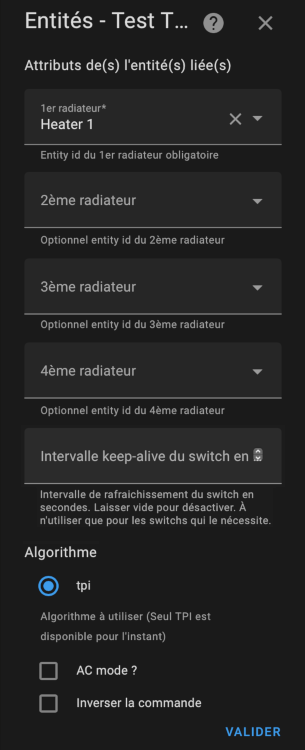
### Pour un thermostat de type ```thermostat_over_switch```
|
||||
|
||||
L'algorithme à utiliser est aujourd'hui limité à TPI est disponible. Voir [algorithme](#algorithme).
|
||||
Si plusieurs entités de type sont configurées, la thermostat décale les activations afin de minimiser le nombre de switch actif à un instant t. Ca permet une meilleure répartition de la puissance puisque chaque radiateur va s'allumer à son tour.
|
||||
@@ -165,14 +182,21 @@ Exemple de déclenchement synchronisé :
|
||||
Il est possible de choisir un thermostat over switch qui commande une climatisation en cochant la case "AC Mode". Dans ce cas, seul le mode refroidissement sera visible.
|
||||
|
||||
|
||||
Pour un thermostat de type ```thermostat_over_climate```:
|
||||
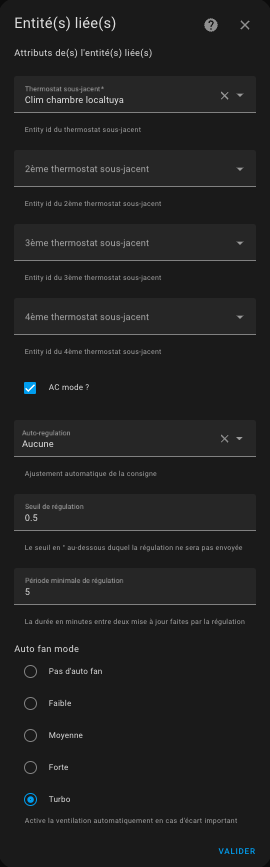
### Pour un thermostat de type ```thermostat_over_climate```:
|
||||
|
||||
|
||||
Il est possible de choisir un thermostat over climate qui commande une climatisation réversible en cochant la case "AC Mode". Dans ce cas, selon l'équipement commandé vous aurez accès au chauffage et/ou au réfroidissement.
|
||||
|
||||
### Pour un thermostat de type ```thermostat_over_valve```:
|
||||

|
||||
Vous pouvez choisir jusqu'à entité du domaine ```number``` ou ```ìnput_number``` qui vont commander les vannes.
|
||||
L'algorithme à utiliser est aujourd'hui limité à TPI est disponible. Voir [algorithme](#algorithme).
|
||||
|
||||
Il est possible de choisir un thermostat over valve qui commande une climatisation en cochant la case "AC Mode". Dans ce cas, seul le mode refroidissement sera visible.
|
||||
|
||||
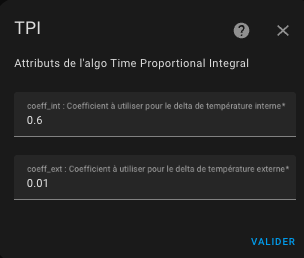
## Configurez les coefficients de l'algorithme TPI
|
||||
|
||||
Si vous avez choisi un thermostat de type ```thermostat_over_switch``` vous arriverez sur cette page :
|
||||
Si vous avez choisi un thermostat de type ```over_switch``` ou ```over_valve``` vous arriverez sur cette page :
|
||||
|
||||
|
||||
|
||||
@@ -198,11 +222,11 @@ Le mode préréglé (preset) vous permet de préconfigurer la température cibl
|
||||
**Aucun** est toujours ajouté dans la liste des modes, car c'est un moyen de ne pas utiliser les preset mais une **température manuelle** à la place.
|
||||
|
||||
>  _*Notes*_
|
||||
1. En modifiant manuellement la température cible, réglez le préréglage sur Aucun (pas de préréglage). De cette façon, vous pouvez toujours définir une température cible même si aucun préréglage n'est disponible.
|
||||
2. Le préréglage standard ``Away`` est un préréglage caché qui n'est pas directement sélectionnable. Versatile Thermostat utilise la gestion de présence ou la gestion de mouvement pour régler automatiquement et dynamiquement la température cible en fonction d'une présence dans le logement ou d'une activité dans la pièce. Voir [gestion de la présence](#configure-the-presence-management).
|
||||
3. Si vous utilisez la gestion du délestage, vous verrez un préréglage caché nommé ``power``. Le préréglage de l'élément chauffant est réglé sur « puissance » lorsque des conditions de surpuissance sont rencontrées et que le délestage est actif pour cet élément chauffant. Voir [gestion de l'alimentation](#configure-the-power-management).
|
||||
4. si vous utilisez la configuration avancée, vous verrez le préréglage défini sur ``sécurité`` si la température n'a pas pu être récupérée après un certain délai
|
||||
5. Si vous ne souhaitez pas utiliser le préréglage, indiquez 0 comme température. Le préréglage sera alors ignoré et ne s'affichera pas dans le composant front
|
||||
> 1. En modifiant manuellement la température cible, réglez le préréglage sur Aucun (pas de préréglage). De cette façon, vous pouvez toujours définir une température cible même si aucun préréglage n'est disponible.
|
||||
> 2. Le préréglage standard ``Away`` est un préréglage caché qui n'est pas directement sélectionnable. Versatile Thermostat utilise la gestion de présence ou la gestion de mouvement pour régler automatiquement et dynamiquement la température cible en fonction d'une présence dans le logement ou d'une activité dans la pièce. Voir [gestion de la présence](#configure-the-presence-management).
|
||||
> 3. Si vous utilisez la gestion du délestage, vous verrez un préréglage caché nommé ``power``. Le préréglage de l'élément chauffant est réglé sur « puissance » lorsque des conditions de surpuissance sont rencontrées et que le délestage est actif pour cet élément chauffant. Voir [gestion de l'alimentation](#configure-the-power-management).
|
||||
> 4. si vous utilisez la configuration avancée, vous verrez le préréglage défini sur ``sécurité`` si la température n'a pas pu être récupérée après un certain délai
|
||||
> 5. Si vous ne souhaitez pas utiliser le préréglage, indiquez 0 comme température. Le préréglage sera alors ignoré et ne s'affichera pas dans le composant front
|
||||
|
||||
## Configurer les portes/fenêtres en allumant/éteignant les thermostats
|
||||
Vous devez avoir choisi la fonctionnalité ```Avec détection des ouvertures``` dans la première page pour arriver sur cette page.
|
||||
@@ -240,10 +264,10 @@ Pour bien régler il est conseillé d'affocher sur un même graphique historique
|
||||
Et c'est tout ! votre thermostat s'éteindra lorsque les fenêtres seront ouvertes et se rallumera lorsqu'il sera fermé.
|
||||
|
||||
>  _*Notes*_
|
||||
1. Si vous souhaitez utiliser **plusieurs capteurs de porte/fenêtre** pour automatiser votre thermostat, créez simplement un groupe avec le comportement habituel (https://www.home-assistant.io/integrations/binary_sensor.group/)
|
||||
2. Si vous n'avez pas de capteur de fenêtre/porte dans votre chambre, laissez simplement l'identifiant de l'entité du capteur vide,
|
||||
3. **Un seul mode est permis**. On ne peut pas configurer un thermostat avec un capteur et une détection automatique. Les 2 modes risquant de se contredire, il n'est pas possible d'avoir les 2 modes en même temps,
|
||||
4. Il est déconseillé d'utiliser le mode automatique pour un équipement soumis à des variations de température fréquentes et normales (couloirs, zones ouvertes, ...)
|
||||
> 1. Si vous souhaitez utiliser **plusieurs capteurs de porte/fenêtre** pour automatiser votre thermostat, créez simplement un groupe avec le comportement habituel (https://www.home-assistant.io/integrations/binary_sensor.group/)
|
||||
> 2. Si vous n'avez pas de capteur de fenêtre/porte dans votre chambre, laissez simplement l'identifiant de l'entité du capteur vide,
|
||||
> 3. **Un seul mode est permis**. On ne peut pas configurer un thermostat avec un capteur et une détection automatique. Les 2 modes risquant de se contredire, il n'est pas possible d'avoir les 2 modes en même temps,
|
||||
> 4. Il est déconseillé d'utiliser le mode automatique pour un équipement soumis à des variations de température fréquentes et normales (couloirs, zones ouvertes, ...)
|
||||
|
||||
## Configurer le mode d'activité ou la détection de mouvement
|
||||
Si vous avez choisi la fonctionnalité ```Avec détection de mouvement```, cliquez sur 'Valider' sur la page précédente et vous y arriverez :
|
||||
@@ -283,10 +307,10 @@ Notez que toutes les valeurs de puissance doivent avoir les mêmes unités (kW o
|
||||
Cela vous permet de modifier la puissance maximale au fil du temps à l'aide d'un planificateur ou de ce que vous voulez.
|
||||
|
||||
>  _*Notes*_
|
||||
1. En cas de délestage, le radiateur est réglé sur le préréglage nommé ```power```. Il s'agit d'un préréglage caché, vous ne pouvez pas le sélectionner manuellement.
|
||||
2. Je l'utilise pour éviter de dépasser la limite de mon contrat d'électricité lorsqu'un véhicule électrique est en charge. Cela crée une sorte d'autorégulation.
|
||||
3. Gardez toujours une marge, car la puissance max peut être brièvement dépassée en attendant le calcul du prochain cycle typiquement ou par des équipements non régulés.
|
||||
4. Si vous ne souhaitez pas utiliser cette fonctionnalité, laissez simplement l'identifiant des entités vide
|
||||
> 1. En cas de délestage, le radiateur est réglé sur le préréglage nommé ```power```. Il s'agit d'un préréglage caché, vous ne pouvez pas le sélectionner manuellement.
|
||||
> 2. Je l'utilise pour éviter de dépasser la limite de mon contrat d'électricité lorsqu'un véhicule électrique est en charge. Cela crée une sorte d'autorégulation.
|
||||
> 3. Gardez toujours une marge, car la puissance max peut être brièvement dépassée en attendant le calcul du prochain cycle typiquement ou par des équipements non régulés.
|
||||
> 4. Si vous ne souhaitez pas utiliser cette fonctionnalité, laissez simplement l'identifiant des entités vide
|
||||
|
||||
## Configurer la présence ou l'occupation
|
||||
Si sélectionnée en première page, cette fonction vous permet de modifier dynamiquement la température de tous les préréglages du thermostat configurés lorsque personne n'est à la maison ou lorsque quelqu'un rentre à la maison. Pour cela, vous devez configurer la température qui sera utilisée pour chaque préréglage lorsque la présence est désactivée. Lorsque le capteur de présence s'éteint, ces températures seront utilisées. Lorsqu'il se rallume, la température "normale" configurée pour le préréglage est utilisée. Voir [gestion des préréglages](#configure-the-preset-temperature).
|
||||
@@ -303,8 +327,8 @@ Pour cela, vous devez configurer :
|
||||
Si le mode AC est utilisé, vous pourrez aussi configurer les températures lorsque l'équipement en mode climatisation.
|
||||
|
||||
>  _*Notes*_
|
||||
1. le changement de température est immédiat et se répercute sur le volet avant. Le calcul prendra en compte la nouvelle température cible au prochain calcul du cycle,
|
||||
2. vous pouvez utiliser le capteur direct person.xxxx ou un groupe de capteurs de Home Assistant. Le capteur de présence gère les états ``on`` ou ``home`` comme présents et les états ``off`` ou ``not_home`` comme absents.
|
||||
> 1. le changement de température est immédiat et se répercute sur le volet avant. Le calcul prendra en compte la nouvelle température cible au prochain calcul du cycle,
|
||||
> 2. vous pouvez utiliser le capteur direct person.xxxx ou un groupe de capteurs de Home Assistant. Le capteur de présence gère les états ``on`` ou ``home`` comme présents et les états ``off`` ou ``not_home`` comme absents.
|
||||
|
||||
## Configuration avancée
|
||||
Ces paramètres permettent d'affiner le réglage du thermostat.
|
||||
@@ -324,70 +348,74 @@ Le quatrième param§tre (``security_default_on_percent``) est la valeur de ``on
|
||||
Voir [exemple de réglages](#examples-tuning) pour avoir des exemples de réglage communs
|
||||
|
||||
>  _*Notes*_
|
||||
1. Lorsque le capteur de température viendra à la vie et renverra les températures, le préréglage sera restauré à sa valeur précédente,
|
||||
3. Attention, deux températures sont nécessaires : la température interne et la température externe et chacune doit donner la température, sinon le thermostat sera en préréglage "security",
|
||||
4. Un service est disponible qui permet de régler les 3 paramètres de sécurité. Ca peut servir à adapter la fonction de sécurité à votre usage,
|
||||
5. Pour un usage naturel, le ``security_default_on_percent`` doit être inférieur à ``security_min_on_percent``,
|
||||
6. Lorsqu'un thermostat de type ``thermostat_over_climate`` passe en mode ``security`` il est éteint. Les paramètres ``security_min_on_percent`` et ``security_default_on_percent`` ne sont alors pas utilisés.
|
||||
> 1. Lorsque le capteur de température viendra à la vie et renverra les températures, le préréglage sera restauré à sa valeur précédente,
|
||||
> 2. Attention, deux températures sont nécessaires : la température interne et la température externe et chacune doit donner la température, sinon le thermostat sera en préréglage "security",
|
||||
> 3. Un service est disponible qui permet de régler les 3 paramètres de sécurité. Ca peut servir à adapter la fonction de sécurité à votre usage,
|
||||
> 4. Pour un usage naturel, le ``security_default_on_percent`` doit être inférieur à ``security_min_on_percent``,
|
||||
> 5. Lorsqu'un thermostat de type ``thermostat_over_climate`` passe en mode ``security`` il est éteint. Les paramètres ``security_min_on_percent`` et ``security_default_on_percent`` ne sont alors pas utilisés.
|
||||
|
||||
## Synthèse des paramètres
|
||||
|
||||
| Paramètre | Libellé | "over switch" | "over climate" |
|
||||
| ----------| --------| --- | ---|
|
||||
| ``name`` | Nom | X | X |
|
||||
| ``thermostat_type`` | Type de thermostat | X | X |
|
||||
| ``temperature_sensor_entity_id`` | Temperature sensor entity id | X | - |
|
||||
| ``external_temperature_sensor_entity_id`` | Température exterieure sensor entity id | X | - |
|
||||
| ``cycle_min`` | Durée du cycle (minutes) | X | X |
|
||||
| ``temp_min`` | Température minimale permise | X | X |
|
||||
| ``temp_max`` | Température maximale permise | X | X |
|
||||
| ``device_power`` | Puissance de l'équipement | X | X |
|
||||
| ``use_window_feature`` | Avec détection des ouvertures | X | X |
|
||||
| ``use_motion_feature`` | Avec détection de mouvement | X | X |
|
||||
| ``use_power_feature`` | Avec gestion de la puissance | X | X |
|
||||
| ``use_presence_feature`` | Avec détection de présence | X | X |
|
||||
| ``heater_entity1_id`` | 1er radiateur | X | - |
|
||||
| ``heater_entity2_id`` | 2ème radiateur | X | - |
|
||||
| ``heater_entity3_id`` | 3ème radiateur | X | - |
|
||||
| ``heater_entity4_id`` | 4ème radiateur | X | - |
|
||||
| ``proportional_function`` | Algorithme | X | - |
|
||||
| ``climate_entity1_id`` | Thermostat sous-jacent | - | X |
|
||||
| ``climate_entity2_id`` | 2ème thermostat sous-jacent | - | X |
|
||||
| ``climate_entity3_id`` | 3ème thermostat sous-jacent | - | X |
|
||||
| ``climate_entity4_id`` | 4ème thermostat sous-jacent | - | X |
|
||||
| ``ac_mode`` | utilisation de l'air conditionné (AC) ? | X | X |
|
||||
| ``tpi_coef_int`` | Coefficient à utiliser pour le delta de température interne | X | - |
|
||||
| ``tpi_coef_ext`` | Coefficient à utiliser pour le delta de température externe | X | - |
|
||||
| ``eco_temp`` | Température en preset Eco | X | X |
|
||||
| ``comfort_temp`` | Température en preset Confort | X | X |
|
||||
| ``boost_temp`` | Température en preset Boost | X | X |
|
||||
| ``eco_ac_temp`` | Température en preset Eco en mode AC | X | X |
|
||||
| ``comfort_ac_temp`` | Température en preset Confort en mode AC | X | X |
|
||||
| ``boost_ac_temp`` | Température en preset Boost en mode AC | X | X |
|
||||
| ``window_sensor_entity_id`` | Détecteur d'ouverture (entity id) | X | X |
|
||||
| ``window_delay`` | Délai avant extinction (secondes) | X | X |
|
||||
| ``window_auto_open_threshold`` | Seuil haut de chute de température pour la détection automatique (en °/min) | X | X |
|
||||
| ``window_auto_close_threshold`` | Seuil bas de chute de température pour la fin de détection automatique (en °/min) | X | X |
|
||||
| ``window_auto_max_duration`` | Durée maximum d'une extinction automatique (en min) | X | X |
|
||||
| ``motion_sensor_entity_id`` | Détecteur de mouvement entity id | X | X |
|
||||
| ``motion_delay`` | Délai avant prise en compte du mouvement (seconds) | X | X |
|
||||
| ``motion_off_delay`` | Délai avant prise en compte de la fin de mouvement (seconds) | X | X |
|
||||
| ``motion_preset`` | Preset à utiliser si mouvement détecté | X | X |
|
||||
| ``no_motion_preset`` | Preset à utiliser si pas de mouvement détecté | X | X |
|
||||
| ``power_sensor_entity_id`` | Capteur de puissance totale (entity id) | X | X |
|
||||
| ``max_power_sensor_entity_id`` | Capteur de puissance Max (entity id) | X | X |
|
||||
| ``power_temp`` | Température si délestaqe | X | X |
|
||||
| ``presence_sensor_entity_id`` | Capteur de présence entity id (true si quelqu'un est présent) | X | X |
|
||||
| ``eco_away_temp`` | Température en preset Eco en cas d'absence | X | X |
|
||||
| ``comfort_away_temp`` | Température en preset Comfort en cas d'absence | X | X |
|
||||
| ``boost_away_temp`` | Température en preset Boost en cas d'absence | X | X |
|
||||
| ``eco_ac_away_temp`` | Température en preset Eco en cas d'absence en mode AC | X | X |
|
||||
| ``comfort_ac_away_temp`` | Température en preset Comfort en cas d'absence en mode AC | X | X |
|
||||
| ``boost_ac_away_temp`` | Température en preset Boost en cas d'absence en mode AC | X | X |
|
||||
| ``minimal_activation_delay`` | Délai minimal d'activation | X | - |
|
||||
| ``security_delay_min`` | Délai maximal entre 2 mesures de températures | X | - |
|
||||
| ``security_min_on_percent`` | Pourcentage minimal de puissance pour passer en mode sécurité | X | - |
|
||||
| ``security_default_on_percent`` | Pourcentage de puissance a utiliser en mode securité | X | - |
|
||||
| Paramètre | Libellé | "over switch" | "over climate" | over valve |
|
||||
| - | - | - | - | - |
|
||||
| ``name`` | Nom | X | X | X |
|
||||
| ``thermostat_type`` | Type de thermostat | X | X | X |
|
||||
| ``temperature_sensor_entity_id`` | Temperature sensor entity id | X | - | X |
|
||||
| ``external_temperature_sensor_entity_id`` | Température exterieure sensor entity id | X | - | X |
|
||||
| ``cycle_min`` | Durée du cycle (minutes) | X | X | X |
|
||||
| ``temp_min`` | Température minimale permise | X | X | X |
|
||||
| ``temp_max`` | Température maximale permise | X | X | X |
|
||||
| ``device_power`` | Puissance de l'équipement | X | X | X |
|
||||
| ``use_window_feature`` | Avec détection des ouvertures | X | X | X |
|
||||
| ``use_motion_feature`` | Avec détection de mouvement | X | X | X |
|
||||
| ``use_power_feature`` | Avec gestion de la puissance | X | X | X |
|
||||
| ``use_presence_feature`` | Avec détection de présence | X | X | X |
|
||||
| ``heater_entity1_id`` | 1er radiateur | X | - | - |
|
||||
| ``heater_entity2_id`` | 2ème radiateur | X | - | - |
|
||||
| ``heater_entity3_id`` | 3ème radiateur | X | - | - |
|
||||
| ``heater_entity4_id`` | 4ème radiateur | X | - | - |
|
||||
| ``proportional_function`` | Algorithme | X | - | - |
|
||||
| ``climate_entity1_id`` | Thermostat sous-jacent | - | X | - |
|
||||
| ``climate_entity2_id`` | 2ème thermostat sous-jacent | - | X | - |
|
||||
| ``climate_entity3_id`` | 3ème thermostat sous-jacent | - | X | - |
|
||||
| ``climate_entity4_id`` | 4ème thermostat sous-jacent | - | X | - |
|
||||
| ``valve_entity1_id`` | Vanne sous-jacente | - | - | X |
|
||||
| ``valve_entity2_id`` | 2ème vanne sous-jacente | - | - | X |
|
||||
| ``valve_entity3_id`` | 3ème vanne sous-jacente | - | - | X |
|
||||
| ``valve_entity4_id`` | 4ème vanne sous-jacente | - | - | X |
|
||||
| ``ac_mode`` | utilisation de l'air conditionné (AC) ? | X | X | X |
|
||||
| ``tpi_coef_int`` | Coefficient à utiliser pour le delta de température interne | X | - | X |
|
||||
| ``tpi_coef_ext`` | Coefficient à utiliser pour le delta de température externe | X | - | X |
|
||||
| ``eco_temp`` | Température en preset Eco | X | X | X |
|
||||
| ``comfort_temp`` | Température en preset Confort | X | X | X |
|
||||
| ``boost_temp`` | Température en preset Boost | X | X | X |
|
||||
| ``eco_ac_temp`` | Température en preset Eco en mode AC | X | X | X |
|
||||
| ``comfort_ac_temp`` | Température en preset Confort en mode AC | X | X | X |
|
||||
| ``boost_ac_temp`` | Température en preset Boost en mode AC | X | X | X |
|
||||
| ``window_sensor_entity_id`` | Détecteur d'ouverture (entity id) | X | X | X |
|
||||
| ``window_delay`` | Délai avant extinction (secondes) | X | X | X |
|
||||
| ``window_auto_open_threshold`` | Seuil haut de chute de température pour la détection automatique (en °/min) | X | X | X |
|
||||
| ``window_auto_close_threshold`` | Seuil bas de chute de température pour la fin de détection automatique (en °/min) | X | X | X |
|
||||
| ``window_auto_max_duration`` | Durée maximum d'une extinction automatique (en min) | X | X | X |
|
||||
| ``motion_sensor_entity_id`` | Détecteur de mouvement entity id | X | X | X |
|
||||
| ``motion_delay`` | Délai avant prise en compte du mouvement (seconds) | X | X | X |
|
||||
| ``motion_off_delay`` | Délai avant prise en compte de la fin de mouvement (seconds) | X | X | X |
|
||||
| ``motion_preset`` | Preset à utiliser si mouvement détecté | X | X | X |
|
||||
| ``no_motion_preset`` | Preset à utiliser si pas de mouvement détecté | X | X | X |
|
||||
| ``power_sensor_entity_id`` | Capteur de puissance totale (entity id) | X | X | X |
|
||||
| ``max_power_sensor_entity_id`` | Capteur de puissance Max (entity id) | X | X | X |
|
||||
| ``power_temp`` | Température si délestaqe | X | X | X |
|
||||
| ``presence_sensor_entity_id`` | Capteur de présence entity id (true si quelqu'un est présent) | X | X | X |
|
||||
| ``eco_away_temp`` | Température en preset Eco en cas d'absence | X | X | X |
|
||||
| ``comfort_away_temp`` | Température en preset Comfort en cas d'absence | X | X | X |
|
||||
| ``boost_away_temp`` | Température en preset Boost en cas d'absence | X | X | X |
|
||||
| ``eco_ac_away_temp`` | Température en preset Eco en cas d'absence en mode AC | X | X | X |
|
||||
| ``comfort_ac_away_temp`` | Température en preset Comfort en cas d'absence en mode AC | X | X | X |
|
||||
| ``boost_ac_away_temp`` | Température en preset Boost en cas d'absence en mode AC | X | X | X |
|
||||
| ``minimal_activation_delay`` | Délai minimal d'activation | X | - | - |
|
||||
| ``security_delay_min`` | Délai maximal entre 2 mesures de températures | X | - | X |
|
||||
| ``security_min_on_percent`` | Pourcentage minimal de puissance pour passer en mode sécurité | X | - | X |
|
||||
| ``security_default_on_percent`` | Pourcentage de puissance a utiliser en mode securité | X | - | X |
|
||||
|
||||
# Exemples de réglage
|
||||
|
||||
@@ -438,12 +466,12 @@ Cette intégration utilise un algorithme proportionnel. Un algorithme proportion
|
||||
Cet algorithme fait converger la température et arrête d'osciller.
|
||||
|
||||
## Algorithme TPI
|
||||
L'algorithme TPI consiste à calculer à chaque cycle un pourcentage d'état On vs Off pour le radiateur en utilisant la température cible, la température actuelle dans la pièce et la température extérieure actuelle.
|
||||
L'algorithme TPI consiste à calculer à chaque cycle un pourcentage d'état On vs Off pour le radiateur en utilisant la température cible, la température actuelle dans la pièce et la température extérieure actuelle. Cet algorithme n'est donc valable que pour les Versatile Thermostat qui régulent : `over_switch` et `over_valve`.
|
||||
|
||||
Le pourcentage est calculé avec cette formule :
|
||||
|
||||
on_percent = coef_int * (température cible - température actuelle) + coef_ext * (température cible - température extérieure)
|
||||
Ensuite, faites 0 <= on_percent <= 1
|
||||
Ensuite, l'algo fait en sorte que 0 <= on_percent <= 1
|
||||
|
||||
Les valeurs par défaut pour coef_int et coef_ext sont respectivement : ``0.6`` et ``0.01``. Ces valeurs par défaut conviennent à une pièce standard bien isolée.
|
||||
|
||||
@@ -451,7 +479,9 @@ Pour régler ces coefficients, gardez à l'esprit que :
|
||||
1. **si la température cible n'est pas atteinte** après une situation stable, vous devez augmenter le ``coef_ext`` (le ``on_percent`` est trop bas),
|
||||
2. **si la température cible est dépassée** après une situation stable, vous devez diminuer le ``coef_ext`` (le ``on_percent`` est trop haut),
|
||||
3. **si l'atteinte de la température cible est trop lente**, vous pouvez augmenter le ``coef_int`` pour donner plus de puissance au réchauffeur,
|
||||
4. **si l'atteinte de la température cible est trop rapide et que des oscillations apparaissent** autour de la cible, vous pouvez diminuer le ``coef_int`` pour donner moins de puissance au radiateur
|
||||
4. **si l'atteinte de la température cible est trop rapide et que des oscillations apparaissent** autour de la cible, vous pouvez diminuer le ``coef_int`` pour donner moins de puissance au radiateur.
|
||||
|
||||
En type `over_valve` le `on_percent` est ramené à une valeur entre 0 et 100% et sert directement à commander l'ouverture de la vanne.
|
||||
|
||||
Voir quelques situations à [examples](#some-results).
|
||||
|
||||
@@ -475,6 +505,7 @@ Dans l'ordre, il y a :
|
||||
11. l'état de sécurité,
|
||||
12. l'état de l'ouverture (si la gestion des ouvertures est configurée),
|
||||
13. l'état du mouvement (si la gestion du mouvements est configurée)
|
||||
14. le pourcentage d'ouverture de la vanne (pour le type `over_valve`)
|
||||
|
||||
Pour colorer les capteurs, ajouter ces lignes et personnalisez les au besoin, dans votre configuration.yaml :
|
||||
|
||||
@@ -616,6 +647,7 @@ Les attributs personnalisés sont les suivants :
|
||||
| ``last_update_datetime`` | La date et l'heure au format ISO8866 de cet état |
|
||||
| ``friendly_name`` | Le nom du thermostat |
|
||||
| ``supported_features`` | Une combinaison de toutes les fonctionnalités prises en charge par ce thermostat. Voir la documentation officielle sur l'intégration climatique pour plus d'informations |
|
||||
| ``valve_open_percent`` | Le pourcentage d'ouverture de la vanne |
|
||||
|
||||
# Quelques résultats
|
||||
|
||||
|
||||
235
README.md
235
README.md
@@ -10,6 +10,7 @@
|
||||
|
||||
- [Thanks for the beer buymecoffee](#thanks-for-the-beer-buymecoffee)
|
||||
- [When to use / not use](#when-to-use--not-use)
|
||||
- [Incompatibilities](#incompatibilities)
|
||||
- [Why another thermostat implementation ?](#why-another-thermostat-implementation-)
|
||||
- [How to install this incredible Versatile Thermostat ?](#how-to-install-this-incredible-versatile-thermostat-)
|
||||
- [HACS installation (recommended)](#hacs-installation-recommended)
|
||||
@@ -17,6 +18,9 @@
|
||||
- [Configuration](#configuration)
|
||||
- [Minimal configuration update](#minimal-configuration-update)
|
||||
- [Select the driven entity](#select-the-driven-entity)
|
||||
- [For a ```thermostat_over_switch``` type thermostat](#for-a-thermostat_over_switch-type-thermostat)
|
||||
- [For a thermostat of type ```thermostat_over_climate```:](#for-a-thermostat-of-type-thermostat_over_climate)
|
||||
- [For a thermostat of type ```thermostat_over_valve```:](#for-a-thermostat-of-type-thermostat_over_valve)
|
||||
- [Configure the TPI algorithm coefficients](#configure-the-tpi-algorithm-coefficients)
|
||||
- [Configure the preset temperature](#configure-the-preset-temperature)
|
||||
- [Configure the doors/windows turning on/off the thermostats](#configure-the-doorswindows-turning-onoff-the-thermostats)
|
||||
@@ -54,33 +58,38 @@
|
||||
This custom component for Home Assistant is an upgrade and is a complete rewrite of the component "Awesome thermostat" (see [Github](https://github.com/dadge/awesome_thermostat)) with addition of features.
|
||||
|
||||
> _*News*_
|
||||
> * **Release 3.7**: Addition of the Versatile Thermostat type `over valve` to control a TRV valve directly or any other dimmer type equipment for heating. Regulation is then done directly by acting on the opening percentage of the underlying entity: 0 the valve is cut off, 100: the valve is fully opened. See [#131](https://github.com/jmcollin78/versatile_thermostat/issues/131)
|
||||
> * **Release 3.6**: Added the `motion_off_delay` parameter to improve motion management [#116](https://github.com/jmcollin78/versatile_thermostat/issues/116), [#128](https ://github.com/jmcollin78/versatile_thermostat/issues/128). Added AC (air conditioning) mode for a VTherm over switch. Preparing the Github project to facilitate contributions [#127](https://github.com/jmcollin78/versatile_thermostat/issues/127)
|
||||
> * **Release 3.5**: Multiple thermostats when using "thermostat over another thermostat" mode [#113](https://github.com/jmcollin78/versatile_thermostat/issues/113)
|
||||
> * **Release 3.4**: bug fixes and expose preset temperatures for AC mode [#103](https://github.com/jmcollin78/versatile_thermostat/issues/103)
|
||||
> * **Release 3.3**: add the Air Conditionned mode (AC). This feature allow to use the eventual AC mode of your underlying climate entity. You have to check the "Use AC mode" checkbox in configuration and give preset temperature value for AC mode and AC mode when absent if absence is configured
|
||||
> * **Release 3.2**: add the ability to control multiple switches from the same thermostat. In this mode, the switches are triggered with a delay to minimize the power required at one time (we minimize the recovery periods). See [Configuration](#select-the-driven-entity)
|
||||
<details>
|
||||
<summary>Others releases</summary>
|
||||
|
||||
> * **Release 3.1**: added detection of open windows/doors by temperature drop. This new function makes it possible to automatically stop a radiator when the temperature drops suddenly. See [Auto mode](#auto-mode)
|
||||
> * **Major release 3.0**: addition of thermostat equipment and associated sensors (binary and non-binary). Much closer to the Home Assistant philosophy, you now have direct access to the energy consumed by the radiator controlled by the thermostat and many other sensors that will be useful in your automations and dashboard.
|
||||
> * **release 2.3**: addition of the power and energy measurement of the radiator controlled by the thermostat.
|
||||
> * **release 2.2**: addition of a safety function allowing a radiator not to be left heating forever in the event of a thermometer failure
|
||||
> * **major release 2.0**: addition of the "over climate" thermostat allowing you to transform any thermostat into a Versatile Thermostat and add all the functions of the latter.
|
||||
</details>
|
||||
|
||||
# Thanks for the beer [buymecoffee](https://www.buymeacoffee.com/jmcollin78)
|
||||
Many thanks to @salabur, @pvince83, @bergoglio, @EPicLURcher, @ecolorado66, @Kriss1670, @maia, @f.maymil for the beers. It's very pleasing.
|
||||
Many thanks to @salabur, @pvince83, @bergoglio, @EPicLURcher, @ecolorado66, @Kriss1670, @maia, @f.maymil, @moutte69 for the beers. It's very pleasing.
|
||||
|
||||
|
||||
# When to use / not use
|
||||
This thermostat can control 2 types of equipment:
|
||||
1. a heater that only works in on/off mode (named ```thermostat_over_switch```). Versatile Thermostat will regulate the length of a heating cycle and the pauses in-between by controlling a binary on/off switch. This mode is e.g. suitable for an electrical radiator controlled by a switch. The minimum configuration required to use this type of thermostat is:
|
||||
- an equipment such as a radiator (a ```switch``` or equivalent),
|
||||
- a temperature probe for the room (or an input_number),
|
||||
- an external temperature sensor (think about weather integration if you don't have one)
|
||||
2. another thermostat that has its own operating modes (named ```thermostat_over_climate```). Versatile Thermostat will regulate the target temperature of a climate entity. Common examples for this mode are the control of thermostatic radiator valves (TRV), air-conditions (AC), floor heating systems and pellet heating. For this type of thermostat, the minimum configuration requires:
|
||||
- an equipment such as air conditioning or thermostatic valve (TRV) which is controlled by its own ```climate``` type entity,
|
||||
|
||||
This thermostat can control 3 types of equipment:
|
||||
1. a radiator that only operates in on/off mode (called ``thermostat_over_switch```). The minimum configuration necessary to use this type thermostat is:
|
||||
1. equipment such as a radiator (a ``switch``` or equivalent),
|
||||
2. a temperature probe for the room (or an input_number),
|
||||
3. an external temperature sensor (consider weather integration if you don't have one)
|
||||
2. another thermostat which has its own operating modes (named ``thermostat_over_climate```). For this type of thermostat the minimum configuration requires:
|
||||
1. equipment - such as air conditioning, a thermostatic valve - which is controlled by its own ``climate'' type entity,
|
||||
3. equipment which can take a value from 0 to 100% (called `thermostat_over_valve`). At 0 the heating is cut off, 100% it is fully opened. This type allows you to control a thermostatic valve (see Shelly valve) which exposes an entity of type `number.` allowing you to directly control the opening of the valve. Versatile Thermostat regulates the room temperature by adjusting the opening percentage, using the interior and exterior temperature sensors using the TPI algorithm described below.
|
||||
The ```thermostat_over_climate``` type allows you to add all the functionality provided by VersatileThermostat to your existing equipment. The climate VersatileThermostat entity will control your existing climate entity, turning it off if the windows are open, switching it to Eco mode if no one is present, etc. See [here](#why-a-new-implementation-of-the-thermostat). For this type of thermostat, any heating cycles are controlled by the underlying climate entity and not by the Versatile Thermostat itself.
|
||||
|
||||
Because this integration aims to control the radiator taking into account the configured preset and the ambient temperature, this information is mandatory.
|
||||
## Incompatibilities
|
||||
|
||||
Some TRV type thermostats are known to be incompatible with the Versatile Thermostat. This is the case for the following valves:
|
||||
1. Danfoss POPP valves with temperature feedback. It is impossible to turn off this valve and it self-regulates, causing conflicts with the VTherm,
|
||||
@@ -88,7 +97,6 @@ Some TRV type thermostats are known to be incompatible with the Versatile Thermo
|
||||
|
||||
# Why another thermostat implementation ?
|
||||
|
||||
|
||||
This component named __Versatile thermostat__ manage the following use cases :
|
||||
- Configuration through standard integration GUI (using Config Entry flow),
|
||||
- Full uses of **presets mode**,
|
||||
@@ -106,7 +114,7 @@ This component named __Versatile thermostat__ manage the following use cases :
|
||||
## HACS installation (recommended)
|
||||
|
||||
1. Install [HACS](https://hacs.xyz/). That way you get updates automatically.
|
||||
2. Add this Github repository as custom repository in HACS settings.
|
||||
2. The Versatile Thermostat integration is now offered directly from the HACF interface (integration tab).
|
||||
3. search and install "Versatile Thermostat" in HACS and click `install`.
|
||||
4. Restart Home Assistant,
|
||||
5. Then you can add an Versatile Thermostat integration in the integration page. You add as many Versatile Thermostat that you need (typically one per heater that should be managed)
|
||||
@@ -138,37 +146,54 @@ Then follow the configurations steps as follow:
|
||||
|
||||
Give the main mandatory attributes:
|
||||
1. a name (will be the name of the integration and also the name of the climate entity)
|
||||
2. the type of thermostat ```thermostat_over_switch``` to control a radiator controlled by a switch or ```thermostat_over_climate``` to control another thermostat. Cf. [above](#why-a-new-thermostat-implementation)
|
||||
2. the thermostat type ```thermostat_over_switch``` to control a radiator controlled by a switch or ```thermostat_over_climate``` to control another thermostat, or ```thermostat_over_valve``` Cf. [above](# why-a-new-thermostat-implementation)
|
||||
4. a temperature sensor entity identifier which gives the temperature of the room in which the radiator is installed,
|
||||
5. a temperature sensor entity giving the outside temperature. If you don't have an external sensor, you can use local weather integration
|
||||
6. a cycle duration in minutes. On each cycle, the heater will cycle on and then off for a calculated time to reach the target temperature (see [preset](#configure-the-preset-temperature) below),
|
||||
6. a cycle duration in minutes. On each cycle, the heater will cycle on and then off for a calculated time to reach the target temperature (see [preset](#configure-the-preset-temperature) below). In ```over_climate``` mode, the cycle is only used to carry out basic controls but does not directly regulate the temperature. It's the underlying climate that does it,
|
||||
7. minimum and maximum thermostat temperatures,
|
||||
8. the power of the l'équipement which will activate the power and energy sensors of the device,
|
||||
9. the list of features that will be used for this thermostat. Depending on your choices, the following configuration screens will appear or not.
|
||||
|
||||
>  _*Notes*_
|
||||
1. With the ```thermostat_over_switch``` type, calculation are done at each cycle. So in case of conditions change, you will have to wait for the next cycle to see a change. For this reason, the cycle should not be too long. **5 min is a good value**,
|
||||
2. if the cycle is too short, the heater could never reach the target temperature indeed for heater with accumulation features and it will be unnecessary solicited
|
||||
> 1. With the ```thermostat_over_switch``` type, calculation are done at each cycle. So in case of conditions change, you will have to wait for the next cycle to see a change. For this reason, the cycle should not be too long. **5 min is a good value**,
|
||||
> 2. if the cycle is too short, the heater could never reach the target temperature. For the storage radiator for example it will be used unnecessarily.
|
||||
|
||||
## Select the driven entity
|
||||
Depending on your choice on the type of thermostat, you will have to choose a switch type entity or a climate type entity. Only compatible entities are shown.
|
||||
Depending on your choice of thermostat type, you will need to choose one or more `switch`, `climate` or `number` type entities. Only entities compatible with the type are presented.
|
||||
|
||||
For a ```thermostat_over_switch``` thermostat:
|
||||
>  _*How to choose the type*_
|
||||
> The choice of type is important. Even if it is always possible to modify it afterwards via the configuration HMI, it is preferable to ask yourself the following few questions:
|
||||
> 1. **what type of equipment am I going to pilot?** In order, here is what to do:
|
||||
> 1. if you have a thermostatic valve (TRV) that can be controlled in Home Assistant via a ```number``` type entity (for example a _Shelly TRV_), choose the `over_valve` type. It is the most direct type and which ensures the best regulation,
|
||||
> 2. if you have an electric radiator (with or without pilot wire) and a ```switch``` type entity allows you to turn it on or off, then the ```over_switch``` type is preferable. Regulation will be done by the Versatile Thermostat according to the temperature measured by your thermometer, where you have placed it,
|
||||
> 3. in all other cases, use the ```over_climate``` mode. You keep your original `climate` entity and the Versatile Thermostat "only" controls the on/off and the target temperature of your original thermostat. Regulation is done by your original thermostat in this case. This mode is particularly suitable for all-in-one reversible air conditioning systems whose exposure in Home Assistant is limited to a `climate` type entity.
|
||||
> 2. **what type of regulation do I want?** If the controlled equipment has its own regulation mechanism (air conditioning, certain TRV valve) and this regulation works well, opt for an ``over_climate```
|
||||
It is possible to choose an over switch thermostat which controls air conditioning by checking the "AC Mode" box. In this case, only the cooling mode will be visible.
|
||||
|
||||
### For a ```thermostat_over_switch``` type thermostat
|
||||

|
||||
The algorithm to be used today is limited to TPI is available. See [algorithm](#algorithm)
|
||||
If several type entities are configured, the thermostat staggers the activations in order to minimize the number of active switches at a time t. This allows a better distribution of power since each radiator will turn on in turn.
|
||||
The algorithm to use is currently limited to TPI is available. See [algorithm](#algorithm).
|
||||
If several type entities are configured, the thermostat shifts the activations in order to minimize the number of switches active at a time t. This allows for better power distribution since each radiator will turn on in turn.
|
||||
Example of synchronized triggering:
|
||||

|
||||
|
||||
It is possible to choose an over switch thermostat which controls air conditioning by checking the "AC Mode" box. In this case, only the cooling mode will be visible.
|
||||
|
||||
For a ```thermostat_over_climate``` thermostat:
|
||||
|
||||
### For a thermostat of type ```thermostat_over_climate```:
|
||||

|
||||
|
||||
It is possible to choose an over climate thermostat which controls reversible air conditioning by checking the “AC Mode” box. In this case, depending on the equipment ordered, you will have access to heating and/or cooling.
|
||||
|
||||
### For a thermostat of type ```thermostat_over_valve```:
|
||||

|
||||
You can choose up to domain entity ```number``` or ```ìnput_number``` which will control the valves.
|
||||
The algorithm to use is currently limited to TPI is available. See [algorithm](#algorithm).
|
||||
|
||||
It is possible to choose an over valve thermostat which controls air conditioning by checking the "AC Mode" box. In this case, only the cooling mode will be visible.
|
||||
|
||||
## Configure the TPI algorithm coefficients
|
||||
Click on 'Validate' on the previous page and you will get there:
|
||||
click on 'Validate' on the previous page, and if you choose a ```over_switch``` or ```over_valve``` thermostat and you will get there:
|
||||

|
||||
|
||||
For more informations on the TPI algorithm and tuned please refer to [algorithm](#algorithm).
|
||||
@@ -187,11 +212,11 @@ The preset mode allows you to pre-configurate targeted temperature. Used in conj
|
||||
**None** is always added in the list of modes, as it is a way to not use the presets modes but a **manual temperature** instead.
|
||||
|
||||
>  _*Notes*_
|
||||
1. Changing manually the target temperature, set the preset to None (no preset). This way you can always set a target temperature even if no preset are available.
|
||||
2. standard ``Away`` preset is a hidden preset which is not directly selectable. Versatile Thermostat uses the presence management or movement management to set automatically and dynamically the target temperature depending on a presence in the home or an activity in the room. See [presence management](#configure-the-presence-management).
|
||||
3. if you uses the power shedding management, you will see a hidden preset named ``power``. The heater preset is set to ``power`` when overpowering conditions are encountered and shedding is active for this heater. See [power management](#configure-the-power-management).
|
||||
4. if you uses the advanced configuration you will see the preset set to ``security`` if the temperature could not be retrieved after a certain delay
|
||||
5. ff you don't want to use the preseet, give 0 as temperature. The preset will then been ignored and will not displayed in the front component
|
||||
> 1. Changing manually the target temperature, set the preset to None (no preset). This way you can always set a target temperature even if no preset are available.
|
||||
> 2. standard ``Away`` preset is a hidden preset which is not directly selectable. Versatile Thermostat uses the presence management or movement management to set automatically and dynamically the target temperature depending on a presence in the home or an activity in the room. See [presence management](#configure-the-presence-management).
|
||||
> 3. if you uses the power shedding management, you will see a hidden preset named ``power``. The heater preset is set to ``power`` when overpowering conditions are encountered and shedding is active for this heater. See [power management](#configure-the-power-management).
|
||||
> 4. if you uses the advanced configuration you will see the preset set to ``security`` if the temperature could not be retrieved after a certain delay
|
||||
> 5. ff you don't want to use the preseet, give 0 as temperature. The preset will then been ignored and will not displayed in the front component
|
||||
|
||||
## Configure the doors/windows turning on/off the thermostats
|
||||
You must have chosen the ```With opening detection``` feature on the first page to arrive on this page.
|
||||
@@ -228,10 +253,10 @@ To properly adjust it is advisable to display on the same historical graph the t
|
||||
And that's all ! your thermostat will turn off when the windows are open and turn back on when closed.
|
||||
|
||||
>  _*Notes*_
|
||||
1. If you want to use **multiple door/window sensors** to automate your thermostat, just create a group with the usual behavior (https://www.home-assistant.io/integrations/binary_sensor.group/)
|
||||
2. If you don't have a window/door sensor in your room, just leave the sensor entity id blank,
|
||||
3. **Only one mode is allowed**. You cannot configure a thermostat with a sensor and automatic detection. The 2 modes may contradict each other, it is not possible to have the 2 modes at the same time,
|
||||
4. It is not recommended to use the automatic mode for equipment subject to frequent and normal temperature variations (corridors, open areas, ...)
|
||||
> 1. If you want to use **multiple door/window sensors** to automate your thermostat, just create a group with the usual behavior (https://www.home-assistant.io/integrations/binary_sensor.group/)
|
||||
> 2. If you don't have a window/door sensor in your room, just leave the sensor entity id blank,
|
||||
> 3. **Only one mode is allowed**. You cannot configure a thermostat with a sensor and automatic detection. The 2 modes may contradict each other, it is not possible to have the 2 modes at the same time,
|
||||
> 4. It is not recommended to use the automatic mode for equipment subject to frequent and normal temperature variations (corridors, open areas, ...)
|
||||
|
||||
## Configure the activity mode or motion detection
|
||||
If you choose the ```Motion management``` feature, lick on 'Validate' on the previous page and you will get there:
|
||||
@@ -255,7 +280,7 @@ What we need:
|
||||
For this to work, the climate thermostat should be in ``Activity`` preset mode.
|
||||
|
||||
>  _*Notes*_
|
||||
1. Be aware that as for the others preset modes, ``Activity`` will only be proposed if it's correctly configure. In other words, the 4 configuration keys have to be set if you want to see Activity in home assistant Interface
|
||||
> 1. Be aware that as for the others preset modes, ``Activity`` will only be proposed if it's correctly configure. In other words, the 4 configuration keys have to be set if you want to see Activity in home assistant Interface
|
||||
|
||||
## Configure the power management
|
||||
|
||||
@@ -269,10 +294,10 @@ Note that all power values should have the same units (kW or W for example).
|
||||
This allows you to change the max power along time using a Scheduler or whatever you like.
|
||||
|
||||
>  _*Notes*_
|
||||
1. When shedding is encountered, the heater is set to the preset named ``power``. This is a hidden preset, you cannot select it manually.
|
||||
2. I use this to avoid exceeded the limit of my electrical power contract when an electrical vehicle is charging. This makes a kind of auto-regulation.
|
||||
3. Always keep a margin, because max power can be briefly exceeded while waiting for the next cycle calculation typically or by not regulated equipement.
|
||||
4. If you don't want to use this feature, just leave the entities id empty
|
||||
> 1. When shedding is encountered, the heater is set to the preset named ``power``. This is a hidden preset, you cannot select it manually.
|
||||
> 2. I use this to avoid exceeded the limit of my electrical power contract when an electrical vehicle is charging. This makes a kind of auto-regulation.
|
||||
> 3. Always keep a margin, because max power can be briefly exceeded while waiting for the next cycle calculation typically or by not regulated equipement.
|
||||
> 4. If you don't want to use this feature, just leave the entities id empty
|
||||
|
||||
## Configure the presence or occupancy
|
||||
If you choose the ```Presence management``` feature, this feature allows you to dynamically changes the temperature of all configured Versatile thermostat's presets when nobody is at home or when someone comes back home. For this, you have to configure the temperature that will be used for each preset when presence is off. When the occupancy sensor turns to off, those tempoeratures will be used. When it turns on again the "normal" temperature configured for the preset is used. See [preset management](#configure-the-preset-temperature).
|
||||
@@ -289,8 +314,8 @@ For this you need to configure:
|
||||
Si le mode AC est utilisé, vous pourrez aussi configurer les températures lorsque l'équipement en mode climatisation.
|
||||
|
||||
>  _*Notes*_
|
||||
1. the switch of temperature is immediate and is reflected on the front component. The calculation will take the new target temperature into account at the next cycle calculation,
|
||||
2. you can use direct person.xxxx sensor or group of sensors of Home Assistant. The presence sensor handles ``on`` or ``home`` states as present and ``off`` or ``not_home`` state as absent.
|
||||
> 1. the switch of temperature is immediate and is reflected on the front component. The calculation will take the new target temperature into account at the next cycle calculation,
|
||||
> 2. you can use direct person.xxxx sensor or group of sensors of Home Assistant. The presence sensor handles ``on`` or ``home`` states as present and ``off`` or ``not_home`` state as absent.
|
||||
|
||||
## Advanced configuration
|
||||
Those parameters allows to fine tune the thermostat.
|
||||
@@ -310,70 +335,74 @@ The fourth parameter (``security_default_on_percent``) is the ``on_percent`` val
|
||||
See [example tuning](#examples-tuning) for common tuning examples
|
||||
|
||||
> _*Notes*_
|
||||
1. When the temperature sensor comes to life and returns the temperatures, the preset will be restored to its previous value,
|
||||
3. Attention, two temperatures are needed: internal temperature and external temperature and each must give the temperature, otherwise the thermostat will be in "security" preset,
|
||||
4. A service is available that allows you to set the 3 security parameters. This can be used to adapt the security function to your use.
|
||||
5. For natural usage, the ``security_default_on_percent`` should be less than ``security_min_on_percent``,
|
||||
6. When a ``thermostat_over_climate`` type thermostat goes into ``security`` mode it is turned off. The ``security_min_on_percent`` and ``security_default_on_percent`` parameters are then not used.
|
||||
> 1. When the temperature sensor comes to life and returns the temperatures, the preset will be restored to its previous value,
|
||||
> 2. Attention, two temperatures are needed: internal temperature and external temperature and each must give the temperature, otherwise the thermostat will be in "security" preset,
|
||||
> 3. A service is available that allows you to set the 3 security parameters. This can be used to adapt the security function to your use.
|
||||
> 4. For natural usage, the ``security_default_on_percent`` should be less than ``security_min_on_percent``,
|
||||
> 5. When a ``thermostat_over_climate`` type thermostat goes into ``security`` mode it is turned off. The ``security_min_on_percent`` and ``security_default_on_percent`` parameters are then not used.
|
||||
|
||||
## Parameters synthesis
|
||||
|
||||
| Paramètre | Libellé | "over switch" | "over climate" |
|
||||
| ----------| --------| --- | --- |
|
||||
| ``name`` | Name | X | X |
|
||||
| ``thermostat_type`` | Thermostat type | X | X |
|
||||
| ``temperature_sensor_entity_id`` | Temperature sensor entity id | X | - |
|
||||
| ``external_temperature_sensor_entity_id`` | External temperature sensor entity id | X | - |
|
||||
| ``cycle_min`` | Cycle duration (minutes) | X | X |
|
||||
| ``temp_min`` | Minimal temperature allowed | X | X |
|
||||
| ``temp_max`` | Maximal temperature allowed | X | X |
|
||||
| ``device_power`` | Device power | X | X |
|
||||
| ``use_window_feature`` | Use window detection | X | X |
|
||||
| ``use_motion_feature`` | Use motion detection | X | X |
|
||||
| ``use_power_feature`` | Use power management | X | X |
|
||||
| ``use_presence_feature`` | Use presence detection | X | X |
|
||||
| ``heater_entity1_id`` | 1rst heater switch | X | - |
|
||||
| ``heater_entity2_id`` | 2nd heater switch | X | - |
|
||||
| ``heater_entity3_id`` | 3rd heater switch | X | - |
|
||||
| ``heater_entity4_id`` | 4th heater switch | X | - |
|
||||
| ``proportional_function`` | Algorithm | X | - |
|
||||
| ``climate_entity1_id`` | 1rst underlying climate | - | X |
|
||||
| ``climate_entity2_id`` | 2nd underlying climate | - | X |
|
||||
| ``climate_entity3_id`` | 3rd underlying climate | - | X |
|
||||
| ``climate_entity4_id`` | 4th underlying climate | - | X |
|
||||
| ``ac_mode`` | Use the Air Conditioning (AC) mode | X | X |
|
||||
| ``tpi_coef_int`` | Coefficient to use for internal temperature delta | X | - |
|
||||
| ``tpi_coef_ext`` | Coefficient to use for external temperature delta | X | - |
|
||||
| ``eco_temp`` | Temperature in Eco preset | X | X |
|
||||
| ``comfort_temp`` | Temperature in Comfort preset | X | X |
|
||||
| ``boost_temp`` | Temperature in Boost preset | X | X |
|
||||
| ``eco_ac_temp`` | Temperature in Eco preset for AC mode | X | X |
|
||||
| ``comfort_ac_temp`` | Temperature in Comfort preset for AC mode | X | X |
|
||||
| ``boost_ac_temp`` | Temperature in Boost preset for AC mode | X | X |
|
||||
| ``window_sensor_entity_id`` | Window sensor entity id | X | X |
|
||||
| ``window_delay`` | Window sensor delay (seconds) | X | X |
|
||||
| ``window_auto_open_threshold`` | Temperature decrease threshold for automatic window open detection (in °/min) | X | X |
|
||||
| ``window_auto_close_threshold`` | Temperature increase threshold for end of automatic detection (in °/min) | X | X |
|
||||
| ``window_auto_max_duration`` | Maximum duration of automatic window open detection (in min) | X | X |
|
||||
| ``motion_sensor_entity_id`` | Motion sensor entity id | X | X |
|
||||
| ``motion_delay`` | Delay before considering the motion (seconds) | X | X |
|
||||
| ``motion_off_delay`` | Delay before considering the end of motion (seconds) | X | X |
|
||||
| ``motion_preset`` | Preset to use when motion is detected | X | X |
|
||||
| ``no_motion_preset`` | Preset to use when no motion is detected | X | X |
|
||||
| ``power_sensor_entity_id`` | Power sensor entity id | X | X |
|
||||
| ``max_power_sensor_entity_id`` | Max power sensor entity id | X | X |
|
||||
| ``power_temp`` | Temperature for Power shedding | X | X |
|
||||
| ``presence_sensor_entity_id`` | Presence sensor entity id | X | X |
|
||||
| ``eco_away_temp`` | Temperature in Eco preset when no presence | X | X |
|
||||
| ``comfort_away_temp`` | Temperature in Comfort preset when no presence | X | X |
|
||||
| ``boost_away_temp`` | Temperature in Boost preset when no presence | X | X |
|
||||
| ``eco_ac_away_temp`` | Temperature in Eco preset when no presence in AC mode | X | X |
|
||||
| ``comfort_ac_away_temp`` | Temperature in Comfort preset when no presence in AC mode | X | X |
|
||||
| ``boost_ac_away_temp`` | Temperature in Boost preset when no presence in AC mode | X | X |
|
||||
| ``minimal_activation_delay`` | Minimal activation delay | X | - |
|
||||
| ``security_delay_min`` | Security delay (in minutes) | X | X |
|
||||
| ``security_min_on_percent`` | Minimal power percent to enable security mode | X | X |
|
||||
| ``security_default_on_percent`` | Power percent to use in security mode | X | X |
|
||||
| Paramètre | Libellé | "over switch" | "over climate" | "over valve" |
|
||||
| ----------| --------| --- | --- | -- |
|
||||
| ``name`` | Name | X | X | X |
|
||||
| ``thermostat_type`` | Thermostat type | X | X | X |
|
||||
| ``temperature_sensor_entity_id`` | Temperature sensor entity id | X | - | X |
|
||||
| ``external_temperature_sensor_entity_id`` | External temperature sensor entity id | X | - | X |
|
||||
| ``cycle_min`` | Cycle duration (minutes) | X | X | X |
|
||||
| ``temp_min`` | Minimal temperature allowed | X | X | X |
|
||||
| ``temp_max`` | Maximal temperature allowed | X | X | X |
|
||||
| ``device_power`` | Device power | X | X | X |
|
||||
| ``use_window_feature`` | Use window detection | X | X | X |
|
||||
| ``use_motion_feature`` | Use motion detection | X | X | X |
|
||||
| ``use_power_feature`` | Use power management | X | X | X |
|
||||
| ``use_presence_feature`` | Use presence detection | X | X | X |
|
||||
| ``heater_entity1_id`` | 1rst heater switch | X | - | - |
|
||||
| ``heater_entity2_id`` | 2nd heater switch | X | - | - |
|
||||
| ``heater_entity3_id`` | 3rd heater switch | X | - | - |
|
||||
| ``heater_entity4_id`` | 4th heater switch | X | - | - |
|
||||
| ``proportional_function`` | Algorithm | X | - | X |
|
||||
| ``climate_entity1_id`` | 1rst underlying climate | - | X | - |
|
||||
| ``climate_entity2_id`` | 2nd underlying climate | - | X | - |
|
||||
| ``climate_entity3_id`` | 3rd underlying climate | - | X | - |
|
||||
| ``climate_entity4_id`` | 4th underlying climate | - | X | - |
|
||||
| ``valve_entity1_id`` | 1rst underlying valve | - | - | X |
|
||||
| ``valve_entity2_id`` | 2nd underlying valve | - | - | X |
|
||||
| ``valve_entity3_id`` | 3rd underlying valve | - | - | X |
|
||||
| ``valve_entity4_id`` | 4th underlying valve | - | - | X |
|
||||
| ``ac_mode`` | Use the Air Conditioning (AC) mode | X | X | X |
|
||||
| ``tpi_coef_int`` | Coefficient to use for internal temperature delta | X | - | X |
|
||||
| ``tpi_coef_ext`` | Coefficient to use for external temperature delta | X | - | X |
|
||||
| ``eco_temp`` | Temperature in Eco preset | X | X | X |
|
||||
| ``comfort_temp`` | Temperature in Comfort preset | X | X | X |
|
||||
| ``boost_temp`` | Temperature in Boost preset | X | X | X |
|
||||
| ``eco_ac_temp`` | Temperature in Eco preset for AC mode | X | X | X |
|
||||
| ``comfort_ac_temp`` | Temperature in Comfort preset for AC mode | X | X | X |
|
||||
| ``boost_ac_temp`` | Temperature in Boost preset for AC mode | X | X | X |
|
||||
| ``window_sensor_entity_id`` | Window sensor entity id | X | X | X |
|
||||
| ``window_delay`` | Window sensor delay (seconds) | X | X | X |
|
||||
| ``window_auto_open_threshold`` | Temperature decrease threshold for automatic window open detection (in °/min) | X | X | X |
|
||||
| ``window_auto_close_threshold`` | Temperature increase threshold for end of automatic detection (in °/min) | X | X | X |
|
||||
| ``window_auto_max_duration`` | Maximum duration of automatic window open detection (in min) | X | X | X |
|
||||
| ``motion_sensor_entity_id`` | Motion sensor entity id | X | X | X |
|
||||
| ``motion_delay`` | Delay before considering the motion (seconds) | X | X | X |
|
||||
| ``motion_off_delay`` | Delay before considering the end of motion (seconds) | X | X | X |
|
||||
| ``motion_preset`` | Preset to use when motion is detected | X | X | X |
|
||||
| ``no_motion_preset`` | Preset to use when no motion is detected | X | X | X |
|
||||
| ``power_sensor_entity_id`` | Power sensor entity id | X | X | X |
|
||||
| ``max_power_sensor_entity_id`` | Max power sensor entity id | X | X | X |
|
||||
| ``power_temp`` | Temperature for Power shedding | X | X | X |
|
||||
| ``presence_sensor_entity_id`` | Presence sensor entity id | X | X | X |
|
||||
| ``eco_away_temp`` | Temperature in Eco preset when no presence | X | X | X |
|
||||
| ``comfort_away_temp`` | Temperature in Comfort preset when no presence | X | X | X |
|
||||
| ``boost_away_temp`` | Temperature in Boost preset when no presence | X | X | X |
|
||||
| ``eco_ac_away_temp`` | Temperature in Eco preset when no presence in AC mode | X | X | X |
|
||||
| ``comfort_ac_away_temp`` | Temperature in Comfort preset when no presence in AC mode | X | X | X |
|
||||
| ``boost_ac_away_temp`` | Temperature in Boost preset when no presence in AC mode | X | X | X |
|
||||
| ``minimal_activation_delay`` | Minimal activation delay | X | - | X |
|
||||
| ``security_delay_min`` | Security delay (in minutes) | X | X | X |
|
||||
| ``security_min_on_percent`` | Minimal power percent to enable security mode | X | X | X |
|
||||
| ``security_default_on_percent`` | Power percent to use in security mode | X | X | X |
|
||||
|
||||
# Examples tuning
|
||||
|
||||
@@ -424,7 +453,7 @@ This integration uses a proportional algorithm. A Proportional algorithm is usef
|
||||
This algorithm make the temperature converge and stop oscillating.
|
||||
|
||||
## TPI algorithm
|
||||
The TPI algorithm consist in the calculation at each cycle of a percentage of On state vs Off state for the heater using the target temperature, the current temperature in the room and the current external temperature.
|
||||
The TPI algorithm consist in the calculation at each cycle of a percentage of On state vs Off state for the heater using the target temperature, the current temperature in the room and the current external temperature. This algorithm is therefore only valid for Versatile Thermostats which regulate: `over_switch` and `over_valve`.
|
||||
|
||||
The percentage is calculated with this formula:
|
||||
|
||||
@@ -439,6 +468,8 @@ To tune those coefficients keep in mind that:
|
||||
3. **if reaching the target temperature is too slow**, you can increase the ``coef_int`` to give more power to the heater,
|
||||
4. **if reaching the target temperature is too fast and some oscillations appears** around the target, you can decrease the ``coef_int`` to give less power to the heater
|
||||
|
||||
In type `over_valve` the `on_percent` is reduced to a value between 0 and 100% and is used directly to control the opening of the valve.
|
||||
|
||||
See some situations at [examples](#some-results).
|
||||
|
||||
# Sensors
|
||||
@@ -460,7 +491,8 @@ In order, there are:
|
||||
10. presence status (if presence management is configured),
|
||||
11. security status,
|
||||
12. opening status (if opening management is configured),
|
||||
13. motion status (if motion management is configured)
|
||||
13. motion status (if motion management is configured),
|
||||
14. the valve opening percentage (for the `over_valve` type)
|
||||
|
||||
To color the sensors, add these lines and customize them as needed, in your configuration.yaml:
|
||||
|
||||
@@ -602,6 +634,7 @@ Custom attributes are the following:
|
||||
| ``last_update_datetime`` | The date and time in ISO8866 format of this state |
|
||||
| ``friendly_name`` | The name of the thermostat |
|
||||
| ``supported_features`` | A combination of all features supported by this thermostat. See official climate integration documentation for more informations |
|
||||
| ``valve_open_percent`` | The opening percentage of the valve |
|
||||
|
||||
# Some results
|
||||
|
||||
|
||||
@@ -121,8 +121,6 @@ class BaseThermostat(ClimateEntity, RestoreEntity):
|
||||
"""Representation of a base class for all Versatile Thermostat device."""
|
||||
|
||||
# The list of VersatileThermostat entities
|
||||
# No more needed
|
||||
# _registry: dict[str, object] = {}
|
||||
_hass: HomeAssistant
|
||||
_last_temperature_mesure: datetime
|
||||
_last_ext_temperature_mesure: datetime
|
||||
@@ -135,6 +133,43 @@ class BaseThermostat(ClimateEntity, RestoreEntity):
|
||||
_underlyings: list[UnderlyingEntity]
|
||||
_last_change_time: datetime
|
||||
|
||||
_entity_component_unrecorded_attributes = ClimateEntity._entity_component_unrecorded_attributes.union(frozenset(
|
||||
{
|
||||
"type",
|
||||
"eco_temp",
|
||||
"boost_temp",
|
||||
"comfort_temp",
|
||||
"eco_away_temp",
|
||||
"boost_away_temp",
|
||||
"comfort_away_temp",
|
||||
"power_temp",
|
||||
"ac_mode",
|
||||
"current_power_max",
|
||||
"saved_preset_mode",
|
||||
"saved_target_temp",
|
||||
"saved_hvac_mode",
|
||||
"security_delay_min",
|
||||
"security_min_on_percent",
|
||||
"security_default_on_percent",
|
||||
"last_temperature_datetime",
|
||||
"last_ext_temperature_datetime",
|
||||
"minimal_activation_delay_sec",
|
||||
"device_power",
|
||||
"mean_cycle_power",
|
||||
"last_update_datetime",
|
||||
"timezone",
|
||||
"window_sensor_entity_id",
|
||||
"window_delay_sec",
|
||||
"window_auto_open_threshold",
|
||||
"window_auto_close_threshold",
|
||||
"window_auto_max_duration",
|
||||
"motion_sensor_entity_id",
|
||||
"presence_sensor_entity_id",
|
||||
"power_sensor_entity_id",
|
||||
"max_power_sensor_entity_id",
|
||||
}
|
||||
))
|
||||
|
||||
def __init__(self, hass: HomeAssistant, unique_id, name, entry_infos) -> None:
|
||||
"""Initialize the thermostat."""
|
||||
|
||||
|
||||
@@ -1,3 +1,4 @@
|
||||
# pylint: disable=line-too-long
|
||||
""" A climate over switch classe """
|
||||
import logging
|
||||
from datetime import timedelta
|
||||
@@ -18,6 +19,12 @@ _LOGGER = logging.getLogger(__name__)
|
||||
class ThermostatOverClimate(BaseThermostat):
|
||||
"""Representation of a base class for a Versatile Thermostat over a climate"""
|
||||
|
||||
_entity_component_unrecorded_attributes = BaseThermostat._entity_component_unrecorded_attributes.union(frozenset(
|
||||
{
|
||||
"is_over_climate", "start_hvac_action_date", "underlying_climate_0", "underlying_climate_1",
|
||||
"underlying_climate_2", "underlying_climate_3"
|
||||
}))
|
||||
|
||||
def __init__(self, hass: HomeAssistant, unique_id, name, entry_infos) -> None:
|
||||
"""Initialize the thermostat over switch."""
|
||||
super().__init__(hass, unique_id, name, entry_infos)
|
||||
|
||||
@@ -1,3 +1,5 @@
|
||||
# pylint: disable=line-too-long
|
||||
|
||||
""" A climate over switch classe """
|
||||
import logging
|
||||
from homeassistant.core import HomeAssistant
|
||||
@@ -20,6 +22,13 @@ _LOGGER = logging.getLogger(__name__)
|
||||
class ThermostatOverSwitch(BaseThermostat):
|
||||
"""Representation of a base class for a Versatile Thermostat over a switch."""
|
||||
|
||||
_entity_component_unrecorded_attributes = BaseThermostat._entity_component_unrecorded_attributes.union(frozenset(
|
||||
{
|
||||
"is_over_switch", "underlying_switch_0", "underlying_switch_1",
|
||||
"underlying_switch_2", "underlying_switch_3", "on_time_sec", "off_time_sec",
|
||||
"cycle_min", "function", "tpi_coef_int", "tpi_coef_ext"
|
||||
}))
|
||||
|
||||
def __init__(self, hass: HomeAssistant, unique_id, name, entry_infos) -> None:
|
||||
"""Initialize the thermostat over switch."""
|
||||
super().__init__(hass, unique_id, name, entry_infos)
|
||||
|
||||
@@ -19,6 +19,13 @@ _LOGGER = logging.getLogger(__name__)
|
||||
class ThermostatOverValve(BaseThermostat):
|
||||
"""Representation of a class for a Versatile Thermostat over a Valve"""
|
||||
|
||||
_entity_component_unrecorded_attributes = BaseThermostat._entity_component_unrecorded_attributes.union(frozenset(
|
||||
{
|
||||
"is_over_valve", "underlying_valve_0", "underlying_valve_1",
|
||||
"underlying_valve_2", "underlying_valve_3", "on_time_sec", "off_time_sec",
|
||||
"cycle_min", "function", "tpi_coef_int", "tpi_coef_ext"
|
||||
}))
|
||||
|
||||
def __init__(self, hass: HomeAssistant, unique_id, name, entry_infos) -> None:
|
||||
"""Initialize the thermostat over switch."""
|
||||
super().__init__(hass, unique_id, name, entry_infos)
|
||||
|
||||
BIN
images/config-linked-entity3.png
Normal file
BIN
images/config-linked-entity3.png
Normal file

Binary file not shown.
|
After Width: | Height: | Size: 26 KiB |

Binary file not shown.
|
Before Width: | Height: | Size: 44 KiB After Width: | Height: | Size: 40 KiB |
Reference in New Issue
Block a user