 Aakansha Doshi
ddb7585057
Aakansha Doshi
ddb7585057
* feat: add docs for getCommonBounds

* docs: add docs for frames api support

* docs: update docs for regenerateIds opts in convertToExcalidrawElements

* add docs for ref removal

* add docs for lock support and insertOnCanvasDirectly in setActiveTool

* fix broken links

* update docs for next js support

* update docs for Preact

* add faq

* docs: add `onChange`, `onPointerDown`, `onPointerUp` docs

* docs: update `useDevice` docs

* update docs for disabling image tool

* add docs for withinBounds helpers

* fix lint

* upgrade excal

* add docusaurus2-dotenv for expose env vars

* fix env variable and upgrade excal

* Update dev-docs/docs/@excalidraw/excalidraw/api/excalidraw-element-skeleton.mdx

Co-authored-by: David Luzar <5153846+dwelle@users.noreply.github.com>

* update docs

Co-authored-by: David Luzar <5153846+dwelle@users.noreply.github.com>

* update docs for process.env

---------

Co-authored-by: dwelle <5153846+dwelle@users.noreply.github.com>
81 lines
3.6 KiB
Plaintext
81 lines
3.6 KiB
Plaintext
# UIOptions
|
|
|
|
This prop can be used to customise UI of Excalidraw. Currently we support customising [`canvasActions`](#canvasactions), [`dockedSidebarBreakpoint`](#dockedsidebarbreakpoint) [`welcomeScreen`](#welcmescreen) and [`tools`](#tools).
|
|
|
|
<pre>
|
|
{
|
|
<br /> canvasActions?: <a href="https://github.com/excalidraw/excalidraw/blob/master/src/types.ts#L372">
|
|
CanvasActions
|
|
</a>, <br /> dockedSidebarBreakpoint?: number, <br /> welcomeScreen?: boolean <br />
|
|
|
|
}
|
|
</pre>
|
|
|
|
## canvasActions
|
|
|
|
This `prop` controls the visibility of the canvas actions inside the `menu`.
|
|
|
|
| Prop | Type | Default | Description |
|
|
| --- | --- | --- | --- |
|
|
| `changeViewBackgroundColor` | `boolean` | `true` | Indicates whether to show `Background color picker`. |
|
|
| `clearCanvas` | `boolean` | `true` | Indicates whether to show `Clear canvas` button. |
|
|
| `export` | `false` | [`exportOpts`](#exportopts) | `object` | This prop allows to customize the UI inside the export dialog. By default it shows the `save file to disk`. For more details visit [`exportOpts`](#exportopts). |
|
|
| `loadScene` | `boolean` | `true` | Indicates whether to show `Load` button. |
|
|
| `saveToActiveFile` | `boolean` | `true` | Indicates whether to show `Save` button to save to current file. |
|
|
| `toggleTheme` | `boolean` | `null` | `null` | Indicates whether to show `Theme toggle`. When defined as `boolean`, takes precedence over [`props.theme`](/docs/@excalidraw/excalidraw/api/props#theme) to show `Theme toggle`. |
|
|
| `saveAsImage` | `boolean` | `true` | Indicates whether to show `Save as image` button. |
|
|
|
|
```tsx live
|
|
function App() {
|
|
const UIOptions = {
|
|
canvasActions: {
|
|
changeViewBackgroundColor: false,
|
|
clearCanvas: false,
|
|
loadScene: false,
|
|
},
|
|
};
|
|
return (
|
|
<div style={{ height: "500px" }}>
|
|
<Excalidraw UIOptions={UIOptions} />
|
|
</div>
|
|
);
|
|
}
|
|
```
|
|
|
|
### exportOpts
|
|
|
|
The below attributes can be set in `UIOptions.canvasActions.export` to customize the export dialog.
|
|
If `UIOptions.canvasActions.export` is `false` the export button will not be rendered.
|
|
|
|
| Prop | Type | Default | Description |
|
|
| --- | --- | --- | --- |
|
|
| `saveFileToDisk` | `boolean` | `true` | Indicates whether `save file to disk` button should be shown |
|
|
| `onExportToBackend` | `object` | \_ | This callback is triggered when the shareable-link button is clicked in the export dialog. The link button will only be shown if this callback is passed. |
|
|
| `renderCustomUI` | `object` | \_ | This callback should be supplied if you want to render custom UI in the export dialog. |
|
|
|
|
## dockedSidebarBreakpoint
|
|
|
|
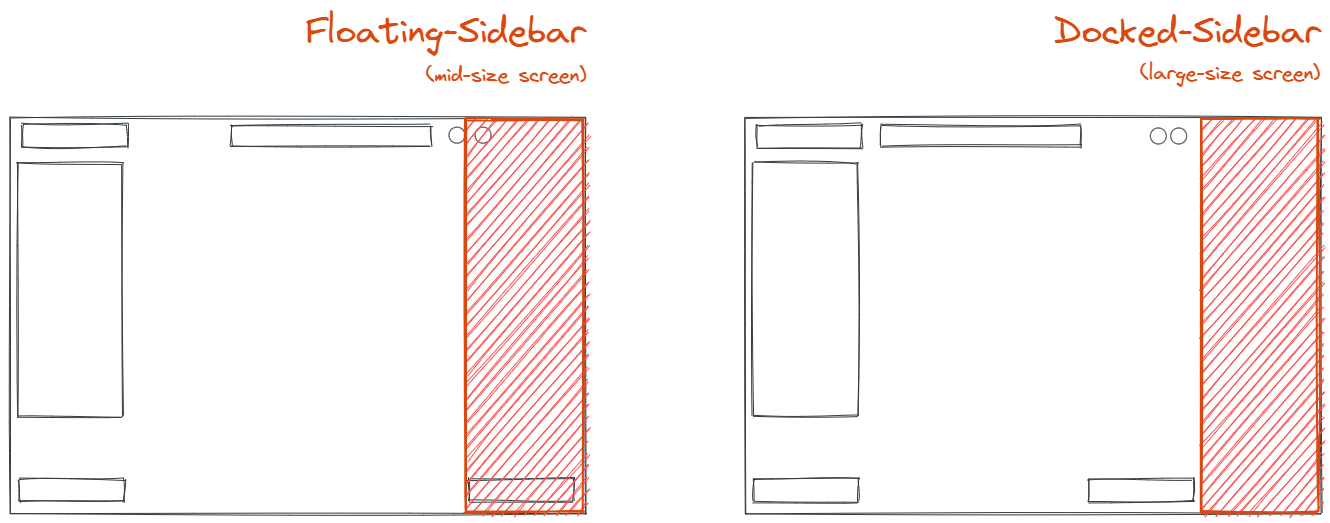
This prop indicates at what point should we break to a docked, permanent sidebar. If not passed it defaults to [`MQ_RIGHT_SIDEBAR_MAX_WIDTH_PORTRAIT`](https://github.com/excalidraw/excalidraw/blob/master/src/constants.ts#L161).
|
|
If the _width_ of the _excalidraw_ container exceeds _dockedSidebarBreakpoint_, the sidebar will be `dockable` and the button to `dock` the sidebar will be shown
|
|
If user choses to `dock` the sidebar, it will push the right part of the UI towards the left, making space for the sidebar as shown below.
|
|
|
|
|
|
|
|
```tsx live
|
|
function App() {
|
|
return (
|
|
<div style={{ height: "500px" }}>
|
|
<Excalidraw UIOptions={{dockedSidebarBreakpoint: 200}}/>
|
|
</div>
|
|
);
|
|
}
|
|
```
|
|
|
|
## tools
|
|
|
|
This `prop ` controls the visibility of the tools in the editor.
|
|
Currently you can control the visibility of `image` tool via this prop.
|
|
|
|
| Prop | Type | Default | Description |
|
|
| --- | --- | --- | --- |
|
|
| image | boolean | true | Decides whether `image` tool should be visible. |