# Cameradar
## An RTSP stream access tool that comes with its library
[](#license)
[](https://hub.docker.com/r/ullaakut/cameradar/)
[](https://travis-ci.org/EtixLabs/cameradar)
[](https://goreportcard.com/report/github.com/EtixLabs/cameradar)
[](https://www.codacy.com/app/brendan-le-glaunec/cameradar?utm_source=github.com&utm_medium=referral&utm_content=EtixLabs/cameradar&utm_campaign=Badge_Grade)
[](https://github.com/EtixLabs/cameradar/releases/latest)
#### Cameradar allows you to:
* **Detect open RTSP hosts** on any accessible target host
* Detect which device model is streaming
* Launch automated dictionary attacks to get their **stream route** (e.g.: `/live.sdp`)
* Launch automated dictionary attacks to get the **username and password** of the cameras
* Retrieve a complete and user-friendly report of the results

## Table of content
- [Docker Image](#docker-image)
- [Configuration](#configuration)
- [Output](#output)
- [Check camera access](#check-camera-access)
- [Command line options](#command-line-options)
- [Contribution](#contribution)
- [Frequently Asked Questions](#frequently-asked-questions)
- [License](#license)
## Docker Image for Cameraccess
Install [docker](https://docs.docker.com/engine/installation/) on your machine, and run the following command:
```bash
docker run ullaakut/cameradar
```
[See command-line options](#command-line-options).
e.g.: `docker run ullaakut/cameradar -t 192.168.100.0/24 -l` will scan the ports 554 and 8554 of hosts on the 192.168.100.0/24 subnetwork and attack the discovered RTSP streams and will output lots of logs.
* `YOUR_TARGET` can be a subnet (e.g.: `172.16.100.0/24`) or even an IP (e.g.: `172.16.100.10`), a range of IPs (e.g.: `172.16.100.10-172.16.100.20`) or a mix of all those separated by commas (e.g.: `172.17.100.0/24,172.16.100.10-172.16.100.20,0.0.0.0`).
* If you want to get the precise results of the nmap scan in the form of an XML file, you can add `-v /your/path:/tmp/cameradar_scan.xml` to the docker run command, before `ullaakut/cameradar`.
* If you use the `-r` and `-c` options to specify your
### Library
### Dependencies of the library
- `curl-dev` / `libcurl` (depending on your OS)
- `nmap`
- `github.com/pkg/errors`
- `gopkg.in/go-playground/validator.v9`
- `github.com/andelf/go-curl`
#### Installing the library
`go get github.com/EtixLabs/cameradar`
After this command, the *cameradar* library is ready to use. Its source will be in:
$GOPATH/src/pkg/github.com/EtixLabs/cameradar
You can use `go get -u` to update the package.
Here is an overview of the exposed functions of this library:
#### Discovery
You can use the cameradar library for simple discovery purposes if you don't need to access the cameras but just to be aware of their existence.

The Discover function calls the RunNmap function as well as the ParseNmapResults function and returns the discovered streams without attempting any attack.
It will use default values for its calls to RunNmap:
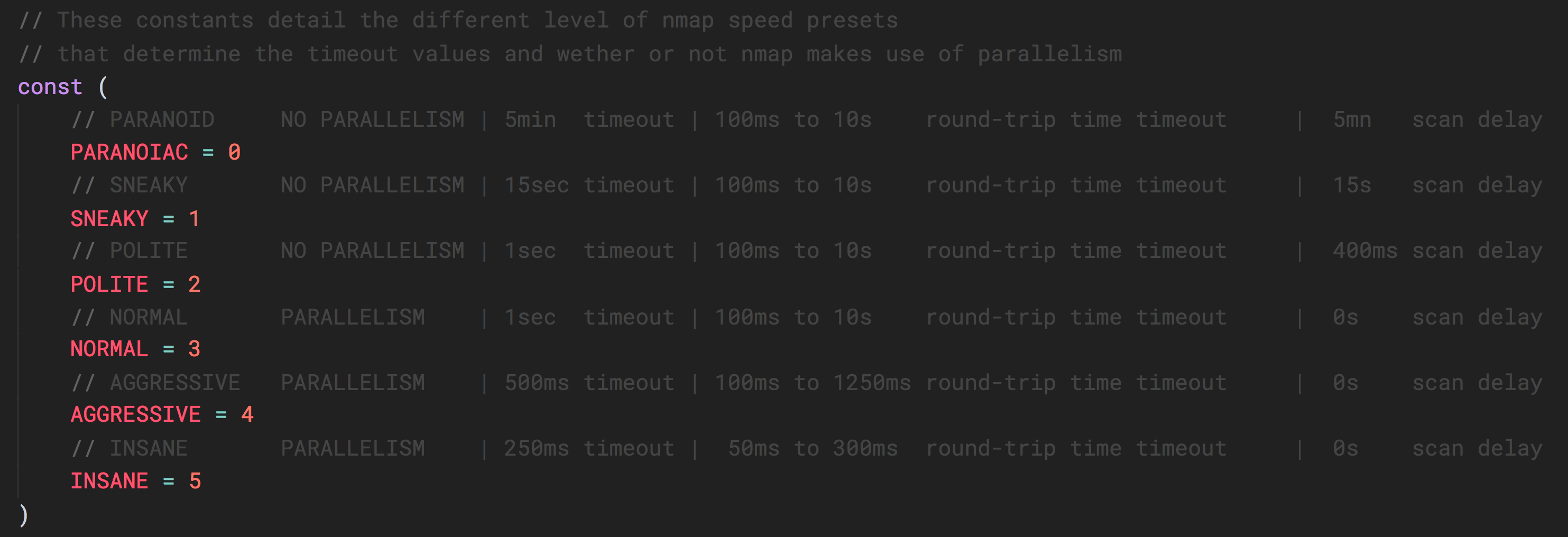
This describes the nmap time presets. You can pass a value between 1 and 5 as described in this table, to the RunNmap function.

The RunNmap function will execute nmap and generate an XML file containing the results of the scan.

The ParseNmapResult function will open the specified XML file and return all open RTSP streams found within it.
#### Attack
If you already know which hosts and ports you want to attack, you can also skip the discovery part and use directly the attack functions. The attack functions also take a timeout value as a parameter.

The AttackCredentials function takes valid streams as an input (with IP addresses and ports) and will attempt to guess their credentials using the provided dictionary.

The AttackRoute function takes valid streams as an input (with IP addresses and ports) and will attempt to guess their routes using the provided dictionary.
#### Data models
Here are the different data models useful to use the exposed functions of the cameradar library.

#### Dictionary loaders
The cameradar library also provides two functions that take file paths as inputs and return the appropriate data models filled.

LoadCredentials takes a JSON file that has the same format as [this one](dictionary/credentials.json).

LoadRoutes takes a file that has the same format as [this one](dictionary/routes). Warning: This file is not JSON.
#### Miscellaneous

RTSPURL allows you to generate the full URL of a stream.
### Configuration
The **RTSP port used for most cameras is 554**, so you should probably specify 554 as one of the ports you scan. Not specifying any ports to the cameraccess application will scan the 554 and 8554 ports.
e.g.: `docker run ullaakut/cameradar -p "18554,19000-19010" -t localhost` will scan the ports 18554, and the range of ports between 19000 and 19010 on localhost.
You **can use your own files for the ids and routes dictionaries** used to attack the cameras, but the Cameradar repository already gives you a good base that works with most cameras, in the `/dictionaries` folder.
e.g.:
```bash
docker run -v /my/folder/with/dictionaries:/tmp/dictionaries \
ullaakut/cameradar \
-r "/tmp/dictionaries/my_routes" \
-c "/tmp/dictionaries/my_credentials.json" \
-t 172.19.124.0/24
```
This will put the contents of your folder containing dictionaries in the docker image and will use it for the dictionary attack instead of the default dictionaries provided in the cameradar repo.
## Output
For each camera, Cameraccess will output this:

## Check camera access
If you have [VLC Media Player](http://www.videolan.org/vlc/), you should be able to use the GUI or the command-line to connect to the RTSP stream using this format : `rtsp://username:password@address:port/route`
With the above result, the RTSP URL would be `rtsp://admin:12345@173.16.100.45:554/live.sdp`
## Command line options
* **"-t, --target"**: Set custom target. Required.
* **"-p, --ports"**: (Default: `554,8554`) Set custom ports.
* **"-s, --speed"**: (Default: `4`) Set custom nmap discovery presets to improve speed or accuracy. It's recommended to lower it if you are attempting to scan an unstable and slow network, or to increase it if on a very performant and reliable network. See [this for more info on the nmap timing templates](https://nmap.org/book/man-performance.html).
* **"-T, --timeout"**: (Default: `1000`) Set custom timeout value in miliseconds after which an attack attempt without an answer should give up.
* **"-r, --custom-routes"**: (Default: `dictionaries/routes`) Set custom dictionary path for routes
* **"-c, --custom-credentials"**: (Default: `dictionaries/credentials.json`) Set custom dictionary path for credentials
* **"-o, --nmap-output"**: (Default: `/tmp/cameradar_scan.xml`) Set custom nmap output path
* **"-l, --log"**: Enable debug logs (nmap requests, curl describe requests, etc.)
* **"-h"** : Display the usage information
## Environment variables
Not yet implemented.
## Contribution
See [the contribution document](/CONTRIBUTION.md) to get started.
## Frequently Asked Questions
> Cameradar does not detect any camera!
That means that either your cameras are not streaming in RTSP or that they are not on the target you are scanning. In most cases, CCTV cameras will be on a private subnetwork, isolated from the internet. Use the `-t` option to specify your target.
> Cameradar detects my cameras, but does not manage to access them at all!
Maybe your cameras have been configured and the credentials / URL have been changed. Cameradar only guesses using default constructor values if a custom dictionary is not provided. You can use your own dictionaries in which you just have to add your credentials and RTSP routes. To do that, see how the [configuration](#configuration) works. Also, maybe your camera's credentials are not yet known, in which case if you find them it would be very nice to add them to the Cameradar dictionaries to help other people in the future.
> What happened to the C++ version?
You can still find it under the 1.1.4 tag on this repo, however it was less performant and stable than the current version written in Golang.
> How to use the Cameradar library for my own project?
See the cameraccess example. You just need to run `go get github.com/EtixLabs/cameradar/cameradar` and to use the `cmrdr` package in your code.
> I want to scan my own localhost for some reason and it does not work! What's going on?
Use the `--net=host` flag when launching the cameradar image, or use the binary by running `go run cameraccess/main.go`.
## License
Copyright 2017 Etix Labs
Licensed under the Apache License, Version 2.0 (the "License");
you may not use this file except in compliance with the License.
You may obtain a copy of the License at http://www.apache.org/licenses/LICENSE-2.0
Unless required by applicable law or agreed to in writing, software distributed under the License is distributed on an "AS IS" BASIS, WITHOUT WARRANTIES OR CONDITIONS OF ANY KIND, either express or implied.
See the License for the specific language governing permissions and limitations under the License.